The development of this version cost 6,800 euros. The accumulated cost for this year is 24,399 euros. The accumulated cost since the first version is 24,399 euros, but the cost for you is only the license of 30€.
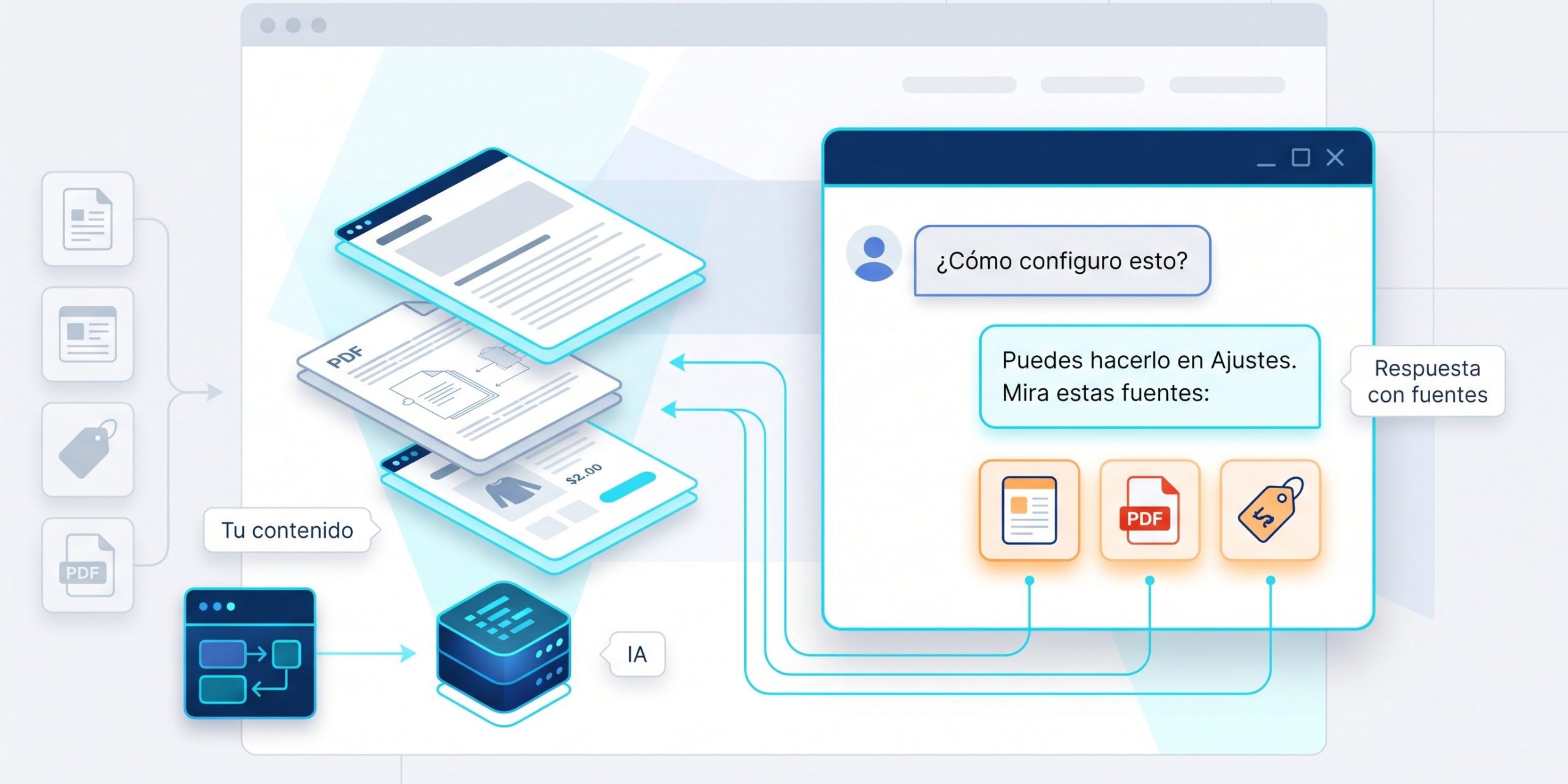
New version 4.2.x of the plugin MCP Content Manager Premium for WordPress and WooCommerce. The great thing about this version is the AI Chat with your own RAG: a chatbot for the public part of your website that responds to your visitors using only your content — the pages, posts, products, and documents that you decide to index — and that cites the sources from which it has drawn each response. It is not a generic ChatGPT stuck in a corner: when the answer is not in your content, it says so. This is complemented by the knowledge bases with access control, eight AI providers to choose from (including Ollama on your own server), a significant expansion of the structured data from Schema.org, and the complete interface in thirteen languages.
Versions of the branch
4.2.0
AI Chat — chatbot with RAG on your own content (new)
- New: AI chatbot for the public part of your website. Responds to your visitors using your own content — the pages, posts, products, and documents you choose to index — so that the answers speak about your site instead of making things up.
- New: Train it your way — index your pages, posts, and products, upload documents (PDF, Word, Excel, CSV, or Markdown) or point it to a webpage for it to read and learn from. Everything you add becomes knowledge that the bot can respond with.
- New: Organize what a bot knows into separate knowledge bases and decide who can read each one — everyone, only registered users, or members of a specific plan (MemberPress, WooCommerce Subscriptions, or Paid Memberships Pro). Ideal for partner-only responses that anonymous visitors never see.
- New: Place it wherever you want with the "AI Chat" block or with the shortcode. The widget is self-contained and does not clash with your theme's styles.
- New: Create multiple independent chatbots, each with its own knowledge, design, and settings — one bot can never respond using another's content.
- New: Choose your AI provider: OpenAI (ChatGPT), Anthropic (Claude), Google (Gemini), Mistral, Groq, DeepSeek, Ollama (runs locally, no API key) or any endpoint compatible with OpenAI.
- New: Multilingual out of the box (WPML / Polylang), works on Multisite, and includes an Elementor widget in addition to the Gutenberg block.
- New: Integrated analytics — frequently asked questions, questions the bot could not answer, visitor ratings, response times, and estimated cost per provider.
- New: Privacy and abuse protection included — rate limiting, optional captcha (reCAPTCHA v3 / hCaptcha / Turnstile) and content cleaning before showing anything to visitors.
- New: Customizable appearance (color presets and style plus custom CSS) with live preview.
- New: Place the chat button where it fits with your design — in any of the four corners, with its own margins, so it does not sit on top of a back-to-top button or a cookie notice.
- Note: If you ever uninstall, your chat data (conversations, documents, and settings) are preserved by default. Activate the "delete on uninstall" option only if you want to permanently remove them.
Languages
- New: The entire plugin now speaks 13 languages — Spanish, Catalan, Basque, Galician, Portuguese (Portugal and Brazil), French, Italian, German (with informal and formal address), Dutch (informal and formal address), and Polish. Everything an administrator reads is translated: settings, the Hub, the client portal, the AI chatbot and its screens, structured data forms, and the emails your site sends.
- Note: The chatbot already responded to visitors in their own language regardless of the panel's language — that is a model thing, not an interface thing. What’s new is the interface.
SEO — Structured Data (Schema.org)
- New: Much broader automatic structured data for search engines to display rich results — ready-to-use content types added for local businesses, real estate listings, events, travel, bookings, vehicles, medical content, and many more.
- Fix: FAQs and other structured data now validate correctly in Google Search Console (corrected a malformed output that Google was rejecting).
WooCommerce
- Fix: The performance optimizer no longer breaks the Cart, Checkout, Filters, or Mini-cart blocks in WooCommerce stores. If you already had these optimizations enabled, save them again once (or clear the cache) to apply the fix.
Security
- Fix: Your license key no longer appears in the page source code. It is now displayed masked (only the last 4 characters), so other administrators of your site cannot copy and reuse it.
Reliability and Uninstallation
- Improvement: Uninstalling the plugin now leaves your site spotless. It removes all plugin database tables, options, scheduled tasks, temporary files, and auxiliary mu-plugins, so nothing is left behind. (Your AI Chat and Custom Fields content is preserved unless you expressly choose to delete it.)
- Fix: The Sentinel security system no longer mistakenly activates "recovery mode" on the first connection.
Hub
- New: Propagate your brand to connected sites — set it up once in the Hub and replace "MCP Content Manager" in the admin of each managed site.
You can purchase the license for MCP Content Manager Premium on the product page.