Description
Manage your WordPress and WooCommerce by talking to an AI
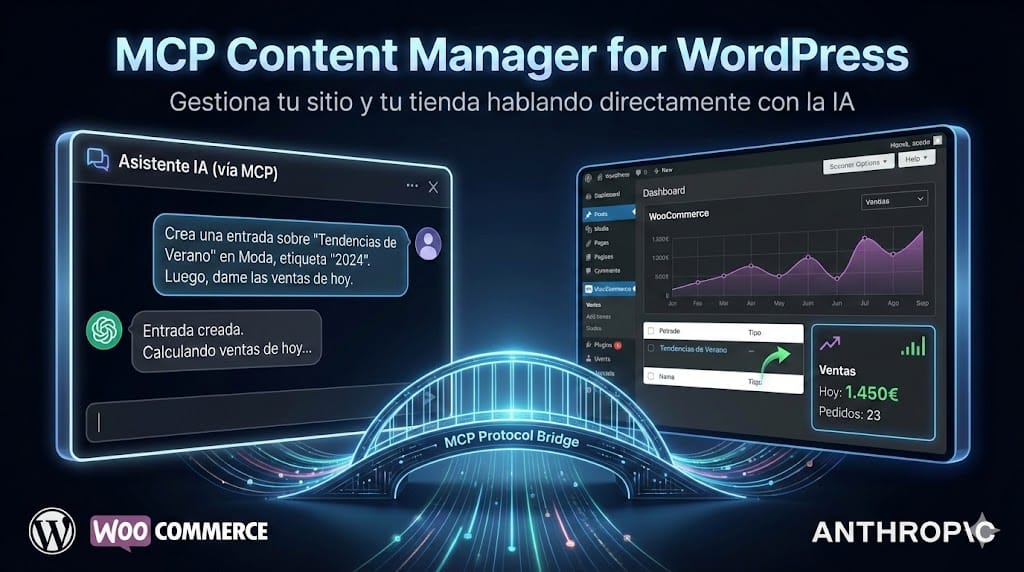
Imagine being able to tell an AI assistant: "Create a post about this week's news" and have the post created directly in your WordPress, with its format, categories, and tags. Or ask, "How much have we sold this month?" and have it instantly show you a sales report from your WooCommerce. Or say, "Analyze the performance of my homepage" and get a performance score with specific recommendations. Or ask, "Translate the entire site into English and German" and have your AI translation plugin do it in the background. Or ask, "Show me the widget tree of my page with Elementor" and get the complete structure instantly. Or say, "Update all plugins on my 15 WordPress sites and notify me if any fail" and have it do so one by one with automatic backup and rollback. That's exactly what MCP Content Manager Premium. This MCP plugin for WordPress connects your site with artificial intelligence assistants through the MCP (Model Context Protocol), an open standard driven by Anthropic and officially adopted by WordPress. Once installed, your AI assistant can read, create, modify, and manage virtually any aspect of your site, from content to server settings, including WooCommerce, performance, security, page builders, translation, and centralized management of multiple WordPress sites. We're not talking about a plugin with buttons and screens. We're talking about a direct bridge between AI and WordPress that provides you withover 340 specialized tools.
You talk to your assistant, and your assistant executes actions on your site — or across your entire network of sites. It is the most comprehensive AI-powered WordPress management plugin on the market.
What can I do with this MCP plugin for WordPress? Real examples
The best way to understand the potential of MCP Content Manager Premium is through examples. Here are things you can ask your AI assistant once you have the plugin installed:
- “Content management with AI Create a post
- “about the benefits of organic coffee, place it in the Food category, and add the tags coffee, organic, and health. Find all posts
- “that haven't been updated in the last 6 months and tell me which ones need review. Review the links
- “of my last 20 articles and tell me if any are broken. Analyze the SEO
- “of the services page and suggest improvements for the title and description. Generate a professional image
for my post about digital marketing and set it as the featured image.
- “Network Hub — Manage multiple WordPress sites from one Connect this new site
- “to my hub using OAuth. List all my managed sites
- “and tell me which ones have pending updates. Update all plugins across the network
- “with automatic backup and rollback if any site fails. Generate a report
- “with all activity from the last month of my clients' sites. Activate emergency login
- “on clientsite.com for 30 minutes. Log out all users
from all sites in the network immediately.
- “Translation with AI — Smart AI Translate Translate this post
- “into English, German, and French using the configured AI provider. How many posts on the site
- “have outdated translations in English? Queue the translation of the entire site
- “to the configured languages in the background. List the available languages
and tell me which ones have pending or outdated translations.
- “Page Builders with AI — Elementor, Beaver Builder, WPBakery Show me the element tree
- “of the homepage in Elementor. Update the text widget color
- “with ID abc123 in Elementor to #FF0000. Export the layout
- “of the product page and use it as a base for the services page. What builders are active
- “on the site and how many pages does each use? Compare the layouts
of the previous and current version of the homepage.
- WooCommerce: products, orders, and customers managed with AI How much have we sold this month? Give me a report with.”
- net sales, number of orders, and average ticket. What are the 10 best-selling products
- of the last quarter? Create a discount coupon
- for 15% off on purchases over €50, valid until the end of the month. Tell me which products are low in stock
- so I can place an order with the supplier. Find all orders from the customer
- juan@example.com and tell me how much has been spent in total. Calculate the MRR
of my active subscriptions and list those that are about to renew.
- “Performance: profiling, optimization, and database cleaning Analyze the performance
- “of my homepage and tell me what score it has from 0 to 100. Compare the performance
- “of the product page and the checkout page, which is slower and why? List the available optimizations
- “and apply all low-risk ones to clean bloat from the core.Clean the database
: delete old revisions, orphaned postmeta, spam comments, expired transients, and expired WooCommerce sessions. First, show me what you are going to delete.
- “Site diagnostics and observability Show me all the hooks
- “registered in wp_head and which plugin each one comes from. List the REST routes
- “of the namespace woocommerce/v3. What scripts and styles
- “are being loaded on the homepage and how much do they weigh? Analyze the SSL certificate
- “of the domain and tell me if there are chain or mixed content issues.Check the DNS records
- “: SPF, DKIM, DMARC, and if it is behind Cloudflare.Perform a complete health check of the domain
: SSL + DNS + URL consistency.
- “Security: auditing, cleaning, and hardening Perform a complete security audit
- “of my site and give me a score. Apply all secure security measures
- “at once. Activate brute force protection
- “with progressive blocking: 5 failures blocks for 15 minutes, 10 failures for one hour, 20 failures for one day. Change the login URL
- “of my site to /my-secret-access. Scan wp-content/
- “for malware: eval/base64, backdoors, PHP in uploads. Clean the core files
by replacing them with the originals from wordpress.org.
- “Role and capability management with AI List all roles
- “on the site with their capabilities and how many users each has. Create a custom role
- “called 'Marketing' by cloning the Editor role but without permission to delete published posts. Audit the capabilities
- “of the user juan@example.com and tell me if they have any dangerous permissions. Assign the role
of Shop Manager to the user maria@example.com so they can manage the store.
- “Human confirmation for high-risk operations Delete the user
- “test_user and reassign their content to the administrator. WooCommerce desde WordPress.org." → Se requiere confirmación humana fuera de banda.
- “Elimina la plantilla de Elementor que ya no uso." → Operación destructiva que necesita tu aprobación explícita.
Mantenimiento, WP-CLI y diagnóstico con IA
- “Actualiza todos los plugins que tengan actualización disponible y haz snapshot antes de cada uno."
- “Ejecuta wp cache flush para limpiar la caché de objetos."
- "¿Hay errores en el log? Revisa los últimos errores de PHP y dime si hay algo preocupante."
- "El sitio muestra un error fatal, ¿puedes mirar qué sucede y arreglarlo?"
Navegación y personalización del tema
- “Crea un menú de navegación FSE con enlaces a Inicio, Blog, Tienda y Contacto."
- “Cambia el logo del sitio por esta imagen que acabo de subir."
- “Lee todas las modificaciones del tema activo y dime qué se puede personalizar."
Más de 340 herramientas MCP para gestionar WordPress y WooCommerce con IA
El plugin expone a la IA un conjunto completo de herramientas que cubren todas las áreas de gestión de un sitio WordPress profesional con WooCommerce. No es un juguete ni una demo: es una herramienta de trabajo pensada para el día a día.
Network Hub — Gestión centralizada de múltiples sitios WordPress (nuevo)
Convert any WordPress site into a central hub from which to manage dozens of remote WordPress sites through AI. Each site retains its independence and security, and the hub only communicates with them via OAuth 2.1 with PKCE and tokens encrypted with AES-256-GCM.
- Three site roles: independent (default), main hub (manages others), or managed site (controlled from a hub). Hub abilities are only loaded when the role requires it, with zero overhead on independent or managed sites.
- Site onboarding with OAuth 2.1 + PKCE: discovery via .well-known, Dynamic Client Registration (DCR), automatic token refresh with rotation, REST callback with autoclosable popup and postMessage. HTTPS enforced on all remote requests.
- Encrypted credential storage: the OAuth tokens of each remote site are encrypted with AES-256-GCM and stored per site independently.
- Remote abilities proxy: executes any MCP ability on a remote site or on multiple sites at once with batch tracking. AI can request "do X on all my sites" and the hub orchestrates it automatically.
- Real-time status and ping: lists sites filtered by status, checks connectivity with real ping and health detail of the remote site.
- Unified activity log: each operation is logged with site, session, batch, source, and tags. Filtered queries by site, date, ability, session, or batch for auditing and reporting.
- Maintenance sessions: groups operations under the same session (format sess_YYYYMMDD_XXXXXXXX, TTL 24h) for complete traceability of an intervention.
- Safe Update Engine: secure update of plugins and themes with the backup → update → verify → auto-rollback cycle. Available for an individual item, all pending updates of a site, or the entire network. Automatic emergency email if something fails in network mode.
- Blocked versions: CRUD management of a blacklist of specific versions per site to avoid known problematic updates.
- Backup verification: checks snapshot coverage across the network with autofix for sites with missing snapshots.
- Multi-site reports: generates HTML reports with inline styles from the activity log, lists existing reports with filters by site/domain/date range, obtains full content in HTML or JSON, and sends them via email with operation logging.
- Remote emergency login: activates emergency access on a managed site with configurable duration from 1 to 60 minutes for specific interventions.
- Network logout: forces logout on all managed sites or on a subset filtered by role, in the event of a security incident.
- Configurable notifications: email and 6 types of alerts, including critical_site_down which cannot be disabled. Automatic detection by events of installations and remote activations via proxy.
- Secure self-destruction: ability mcm/self-uninstall that revokes OAuth, deletes tables, options, snapshots, and mu-plugins and schedules file deletion. Refuses to execute on the main hub itself to prevent disasters.
- Network traceability: all proxy requests add the header X-MCM-Hub so that managed sites know who is calling them.
Site diagnostics and observability (new)
Toolbox to inspect how WordPress is functioning internally, which plugins are intervening in each hook, and how the domain, SSL, and DNS are configured. Designed for developers, maintenance agencies, and diagnosing sites with strange behaviors.
- Registered hooks: lists actions and filters with file, line, priority, and detection of the source plugin to know exactly what is hooked at each point.
- REST routes: discovers all routes of the REST API filtering by namespace or HTTP method.
- Registered shortcodes: lists all active shortcodes of the site with their origin.
- Queued assets: inspects the scripts and styles that are being loaded with size, dependencies, and origin.
- Image sizes: lists all registered image sizes with dimensions and crop configuration.
- Action Scheduler: complete management of scheduled actions — list, cancel, retry, execute, and delete. Mutating operations require human confirmation.
- SSL analysis: complete validation of the certificate, chain, and detection of mixed content on the page.
- DNS records: inspection of DNS records with detection of Cloudflare, SPF, DKIM, and DMARC.
- Domain health: combined audit of SSL + DNS + URL consistency in a single ability.
- Email sending via wp_mail(): sending test emails or notifications from AI with a limit of 10/min based on transients to prevent abuse.
Content and taxonomies
- Create, read, update, and delete content in any type of entry (posts, pages, custom CPTs).
- Advanced search by text, category, custom taxonomy, meta field, date range, or any combination.
- Full Gutenberg support: content is created with the correct block markup, not as plain HTML.
- Taxonomy management: create, edit, and delete categories, tags, and custom taxonomies.
- Media management: upload images from URL, assign featured images, list and delete files from the library.
- Content audit: detects which entries have not been updated for months to plan reviews.
- Link analysis: extracts all links from your articles, detects broken ones, and suggests internal linking opportunities.
Translation with AI — Smart AI Translate
Full integration with Smart AI Translate that allows AI to manage all translation operations of the site directly from the conversation.
- Site translation statistics: coverage by language, pending, obsolete, and completed entries.
- Status by entry: checks if an entry has updated or outdated translation for each language.
- Direct translation: translates entries, taxonomy terms, and options using the AI provider configured in the plugin.
- Flow "assistant as translator": AI can translate content and save it directly without going through the plugin provider.
- Asynchronous queues: queues translations of individual entries, taxonomies, options, or the entire site via Action Scheduler.
- Language management: lists configured and available languages. Deletes translations of a language or of the entire site.
Page Builders — Elementor, Beaver Builder, WPBakery
Full support for the major page builders on the market. AI can inspect, modify, and export layouts from any compatible builder.
- Multi-builder detection: automatically detects which builders are active and how many pages each one uses.
- Element tree: inspects the complete hierarchical structure of any page for Elementor (sections > columns > widgets), Beaver Builder (rows > groups > modules), and WPBakery (nested shortcodes).
- Element editing: updates the configuration of any widget or node by ID directly from the conversation.
- Global colors and typography of Elementor: reads and updates the global color palette and global typography with its CSS variables.
- Export and import layouts: exports the layout of a page as portable JSON and mimics it on another page.
- Layout comparison: compares layouts between two pages or revisions to see what has changed.
- Builders health check: detects orphaned meta, corrupted data, mixed builder usage, and unbalanced shortcodes.
- Elementor Pro: detects modules and capabilities of Elementor Pro, theme builder conditions, and dynamic tags.
MCM Inspector — Visual capture of design changes
Frontend tool that allows capturing design change intentions directly on the site. Select an element, describe what you want to change, and the Inspector creates a task that AI can execute.
- Selection overlay: hover highlighting of elements, automatic generation of CSS and XPath selector, capturing computed styles.
- Task panel: management of all captured design tasks with statistics, filters, and priorities.
- Conflict prevention: automatically deactivates when Elementor, Beaver Builder, WPBakery, or the Customizer are in edit mode.
Integrated SEO with automatic plugin detection
- Reading and writing SEO meta with automatic detection of the active plugin: Yoast SEO, Rank Math, AIOSEO, The SEO Framework, SiteSEO, Slim SEO, Squirrly SEO, and SureRank.
- Titles, descriptions, keywords, robots, canonical and editable Open Graph fields from AI.
- Redirect management (301, 302, 307, 410) compatible with Rank Math, Redirection, and Yoast Premium.
Complete WooCommerce: the most advanced MCP plugin for stores
- Products: create, edit, delete, search by category, SKU, price, stock, type, sale status. Complete management of variations.
- Orders: list, view complete detail (lines, addresses, coupons, notes), change status, add notes, create refunds, and send payment links.
- Customers: search by name or email, view complete profile with LTV, AOV, last orders, and most purchased products.
- Coupons: create and edit coupons with all options (type, amount, expiration, limits, restrictions by product or category).
- Sales reports: gross, net sales, orders, average ticket, items sold, refunds, taxes, and discounts by period.
- Top sellers: best-selling products by quantity and revenue in any period.
- Inventory: complete report with low stock, out of stock, and overall summary.
- Subscriptions: compatible with WooCommerce Subscriptions, YITH, and SUMO. MRR and ARR statistics.
- Settings: shipping zones, payment gateways, tax rates, transactional emails, and +80 store options.
Users and comments
- User management: list, create, edit, delete with content reassignment, view detail with custom meta. Automatic discovery of existing meta fields.
- Comment Moderation: list, approve, reject, mark as spam, reply. Filters by post, status, author, or date.
Performance Profiler: complete overview of your site
Analyze the performance of any page on your site with a profiler that collects 8 types of data simultaneously: SQL queries, assets, hooks, page summary, transients, HTTP calls, DOM analysis, and page builder detection.
- Automatic profiling of any public page via internal HTTP request with token-based security.
- Manual profiling for authenticated pages: cart, checkout, my account. Activated via secure cookie.
- Performance comparison between multiple pages side by side.
- Advanced SQL analysis: slow queries (>50ms), duplicate detection, N+1 patterns, grouping by component and table.
- Page builder detection: Elementor, Divi, WPBakery, Beaver Builder, Bricks, Oxygen, Gutenberg.
- Performance score 0-100 with grades from A+ to F, weighted in 10 categories.
Performance Optimizer: 20 optimizations with one click
Applies predefined performance optimizations that generate a clean and manageable mu-plugin. Each optimization has a risk level and can be undone individually.
- 20 predefined optimizations in 5 categories: core bloat cleanup (emoji, dashicons, heartbeat, oEmbed, etc.), security, WooCommerce, HTTP, and content processing.
- Risk level per optimization (none/low/medium) with warnings for user confirmation.
- Individual or total rollback: undo a specific optimization or all at once.
- Conditional asset loading: dequeue, defer, or conditionally load scripts and styles by page type.
- Automatically generated mu-plugin with individual markers for granular management.
Database cleanup
Clean your WordPress database without the need for additional plugins. Default preview mode so you always see what will be deleted before executing.
- Cleanup actions: old revisions, orphaned postmeta, orphaned commentmeta, spam comments, comments in trash, posts in trash, expired transients, orphaned autoloaded options, expired WooCommerce sessions, optimize tables and autoload analysis.
- Shortcut "cleanup": executes a complete cleanup in a single call, automatically including the cleanup of WooCommerce sessions.
- Default dry_run mode: always previews changes before executing.
- Configurable revision retention: choose how many revisions to keep per post (default 5).
- Batch deletion (1000 rows per batch) to avoid timeouts in large WooCommerce databases.
Security: auditing and cleaning hacked sites
A complete set of diagnostic and remediation tools for when your site has been compromised. All diagnostic tools are 100% read-only, and the cleanup tools require explicit administrator confirmation.
- Unified security audit: evaluation with a weighted score of 0-100 in 6 categories.
- Core integrity: verifies each WordPress file against the official checksums from wordpress.org.
- Malware scan in wp-content/: detects eval/base64 patterns, backdoors, PHP in uploads.
- Database injection scan: scripts, hidden iframes, pharmaceutical spam, fraudulent admins.
- Plugin verification against the official WordPress.org API to detect modifications.
- .htaccess analysis: detects malicious redirects, SEO cloaking, auto_prepend injections.
- Core cleanup: replaces all files with clean versions from wordpress.org and removes injected files.
- Salt regeneration: regenerates the 8 security salts in wp-config.php and audits user_roles.
- Cleanup report: generates a complete report as a private draft in WordPress.
- Automatic snapshot created by Time Machine before any destructive operation.
Security Suite: 23 hardening measures managed with AI
A complete security hardening system for WordPress fully managed by AI. 23 security measures organized into three risk levels: SAFE (applied directly), CAUTION (AI explains risks before applying), and CRITICAL (require backup confirmation).
- Security audit with a score of 0-100 and grades from A+ to F: evaluates 20 scored security measures and generates a report with missing measures and instructions for applying them.
- Batch application of SAFE measures: applies all low-risk measures at once with optional exclusions.
- Progressive brute force protection: automatic blocking by hashed IP with SHA-256: 5 failures → 15 min, 10 failures → 1 hour, 20 failures → 24 hours.
- Session timeout: configurable times by role (30 min for administrators, 60 min for editors by default).
- Custom login URL with emergency recovery via transient or file mcm-emergency-login.txt.
- XML-RPC protection with 3 modes: selective, full blocking (.htaccess deny), and total deactivation.
- HTTP security headers: basic mode (X-Content-Type-Options, X-Frame-Options, Referrer-Policy, Permissions-Policy) and full mode with HSTS and CSP.
- Database prefix change with SQL transactions (COMMIT/ROLLBACK) and partial failure recovery.
- REST API protection: blocks unauthenticated access to /wp/v2/users. Whitelist for MCP, WooCommerce, Jetpack, and Site Health.
- Weak password audit: verifies administrators, editors, and authors against the 50 most common passwords.
- File permissions audit: verifies wp-config.php (440), directories (755), and key files (644). The fix mode automatically applies recommended permissions.
- Forced logout: logs out all active sessions or by specific role. Preserves the OAuth connection of MCP.
- Emergency access to login: temporarily restores /wp-login.php when you have an active custom URL and cannot access.
Roles and Capabilities Manager
A complete system for managing WordPress roles and capabilities directly from AI, with advanced security protections that prevent accidental errors and privilege escalations.
- Complete CRUD of roles: list, create, modify, and delete WordPress roles. Create roles from scratch or clone existing roles with clone_from.
- Capabilities catalog: explore ~45 core WordPress capabilities, ~12 from WooCommerce, 3 from MCP, and dynamic capabilities from third-party plugins.
- Role comparison: side-by-side matrix showing common and unique capabilities among multiple roles.
- Role assignment: assign roles to users by ID, login, or email with built-in security measures.
- User capability audit: complete report of the effective capabilities of any user with warnings for dangerous permissions.
- 32 dangerous capabilities blocked: classified into 3 risk levels (CRITICAL, HIGH, MULTISITE). Administrators can enable them individually from the Roles tab in settings.
- Single admin protection: always active, the site can never be left without at least one administrator.
- Privilege escalation prevention: capabilities cannot be granted that one does not possess.
- Protected roles: core WordPress and WooCommerce roles cannot be deleted. The Administrator role is unmodifiable.
Human Confirmation System (Anti Prompt-Injection)
Architectural defense against indirect prompt injection attacks. More than 40 high-risk operations require out-of-band human confirmation before execution, including new operations from the Network Hub and the diagnostic module.
- Out-of-band confirmation: high-risk operations generate an independent confirmation link that the administrator must approve before execution.
- More than 40 protected operations: user management, roles, option changes, database operations, cache/core cleanup, snapshot restoration/deletion, installing plugins/themes, writing/replacing files. New: site onboarding and offboarding in the hub, multi-site batch proxy, plugin self-destruction, email report sending, remote emergency login, multi-site safe update, network force logout, email sending, mutant Action Scheduler.
- Independent confirmation page: visual card-like interface (similar to OAuth) accessible via REST endpoint, with no dependency on wp-admin.
- HMAC integrity: confirmation parameters are verified with hash_hmac(SHA-256) to prevent database tampering.
- Atomic confirmation: atomic state transitions (pending → confirmed → executed) that prevent race conditions and double execution.
- Non-configurable operation list: the list of operations requiring confirmation is hardcoded in the plugin and cannot be disabled.
- Automatic cleanup: Action Scheduler every 12 hours removes expired pending confirmations.
Maintenance, DevOps, and WP-CLI
- Plugin management: list all (active, inactive, paused), activate, deactivate, install from WordPress.org or ZIP URL.
- Theme installation: install and activate themes from WordPress.org or ZIP URL with prior security snapshot.
- WP-CLI Bridge: execute authorized WP-CLI commands with granular permission system, block list, and injection protection.
- Safe updates: view available updates and execute them with prior automatic snapshots (Time Machine).
- Time Machine: snapshot system that allows reverting to the previous version of any plugin or theme. Now also available to create backups of plugins/themes from any site, not just from the hub.
- File Management: read and edit site files (themes, plugins, wp-config.php, .htaccess) with automatic backup.
- Debug and Logs: enable/disable debug mode and read PHP errors on the spot.
- Cron: list, run, and delete scheduled events.
- Cache: clear object cache, transients, and WooCommerce transients.
- SQL Queries: execute read-only SELECT queries (with sensitive column filtering).
- System Info: complete information about the environment equivalent to WooCommerce's System Status.
- Options Management: read, modify, and delete WordPress and WooCommerce options from an expanded secure list (+57 WP, +80 WC).
- Classic Menus and FSE: create, edit, delete, and assign menus to theme locations. Complete management of FSE navigations with blocks.
- Theme Customization: read and modify theme mods (logo, colors, background, header).
AI Image Generation
- Google Gemini and Image: generate images using AI and save them in the Media Library.
- 10 aspect ratios, 3 sizes (1K/2K/4K), output PNG/JPEG.
- Assign as featured image and insert into content.
- Image Editing: modify existing images with prompts (change text, colors, elements).
WordPress Code Guidelines
- 15 contexts: plugin, block, theme, WooCommerce, REST API, security, performance, WP-CLI, and more.
- 3-level Fallback: fork repo → upstream repo → offline guidelines.
- Automatic Instruction: the MCP server instructs the AI to consult the guidelines before writing code.
Security: the most important aspect of the MCP plugin
A plugin with these capabilities needs to take security very seriously. Every aspect has been designed with the goal of protecting your WordPress site:
- OAuth Authentication: the connection between the AI and your site is made using secure OAuth tokens. Compatible with WAF and nginx proxies.
- OAuth 2.1 + PKCE for the Network Hub: connections between the hub and managed sites use OAuth 2.1 with PKCE, Dynamic Client Registration, automatic refresh with rotation, and forced HTTPS on all requests with a 30s timeout.
- AES-256-GCM encrypted credentials: OAuth tokens for each remote site of the hub are stored encrypted per site independently.
- Automatic Backups: each file modification creates a backup of the original.
- Time Machine: complete ZIP snapshot before each update, installation, or security cleanup for instant rollback.
- Safe Update Engine: backup cycle → update → verify → auto-rollback on each hub update, with emergency email if a network update fails.
- Read-only SQL: the AI can query the database but cannot execute INSERT, UPDATE, DELETE, or DROP.
- Sensitive Data Filtering: passwords, tokens, and sensitive data are automatically filtered.
- Whitelist of Options: only options from the controlled list can be read and modified.
- Protected WP-CLI: 16 dangerous commands blocked by default, granular permissions, escapeshellarg(), metacharacter blocking, and timeout.
- Rate limiting on email sending: 10 emails per minute via transients to prevent abuse of wp_mail() from the AI.
- Emergency Sentinel: independent mu-plugin that works even if WordPress crashes, allowing diagnosis and repair.
- 100% Read-only Diagnosis: all security audit tools are read-only. Cleanup tools require explicit confirmation.
- Security Suite with 3 levels of risk: each hardening measure is classified as SAFE, CAUTION, or CRITICAL.
- Out-of-band human confirmation: more than 40 high-risk operations require explicit approval from the administrator via an independent confirmation link. Architectural protection against indirect prompt injection.
- HMAC Integrity in confirmations: the parameters of each confirmation are verified with hash_hmac(SHA-256, AUTH_KEY) to prevent tampering.
- 32 dangerous capabilities blocked by default: prevention of privilege escalation, protection of single admin, and unmodifiable core roles.
- Protected self-destruction: the ability to self-uninstall is denied from executing on the main hub itself to prevent cascading disasters.
Use Cases: who is this AI plugin for WordPress for?
For the owner of a WooCommerce store
Check your sales, manage orders, create coupons, review inventory, and analyze your customers without navigating the WordPress dashboard. Request sales reports, customer analysis with LTV and AOV, subscription statistics with MRR, and create recovery coupons, all by talking to your AI assistant.
For the content creator or blogger
Create and publish posts by talking to the AI. Request content audits, broken link detection, massive SEO optimization, internal linking opportunities, and AI-generated images for your articles. Like having an editor and an SEO specialist 24/7.
For the WordPress developer or freelancer
Update plugins with automatic rollback, diagnose errors with logs and debug, install plugins and themes from the conversation, run WP-CLI, manage files with backup, and query the database. Profile the performance of any page, apply optimizations safely, and clean the database. Harden site security with 23 automated measures, audit file permissions, and protect login against brute force. Manage user roles and capabilities with advanced protections against privilege escalation. Inspect and modify layouts of Elementor, Beaver Builder, or WPBakery directly from the conversation. Inspect hooks, REST routes, shortcodes, enqueued assets, SSL, and DNS to diagnose any strange behavior. The AI follows the official WordPress guidelines when writing code. All without SSH or hosting panel.
For the WordPress maintenance agency
Turn your main site into a Network Hub from which to manage all your clients' sites with a single conversation. Update plugins across the network with backup and automatic rollback, generate activity reports ready to send, activate timely emergency logins when a client needs help, and in case of an incident, log out all users across the network instantly. Includes a complete maintenance runbook. The AI can perform maintenance on your clients' sites consistently, documented, and with detailed reports. Security audits with scores from A+ to F, performance analysis with scoring, database cleaning, hardening with Security Suite, and optimization: what used to take 30-60 minutes per site is now a conversation of minutes, multiplied across your entire client portfolio. With the human confirmation system, critical operations always require your explicit approval.
For emergencies: hacked site
When a site has been compromised, time is critical. With MCP Content Manager Premium, the AI can perform a complete diagnosis in minutes: verify core integrity, scan for malware in files and database, review .htaccess, classify suspicious directories. And then, clean the core, clear contaminated caches, regenerate security salts, and generate a professional report of everything found and corrected.
Compatible with major MCP clients
MCP Content Manager Premium funciona con cualquier cliente que soporte el protocolo MCP (Model Context Protocol). Esto incluye:


Reviews
There are no reviews yet.