

Description
The premium plugin for Redsys offers practically all payment methods and features, but also offers many premium functionalities and extras that over more than ten years I have detected that every business needs for its operation, ease for the manager and customer, and security. The entire plugin is focused on making life easier for everyone involved and ensuring that the seller is calm and can detect the slightest problem. It is worth noting that I usually release one or two versions each month with new features and improvements, making this a completely live plugin with constant evolution and enhancements. If you want to try it, you can try it here. An installation will be created for you and you will be able to try everything. Keep in mind that there are methods that you will not be able to try simply because you should register for Google Pay and similar services, and your terminal must be compatible with all methods and functionalities; not everything is active by default in Redsys.
Compatibility with the Checkout Block
Compatible methods:
- Redsys Redirection with support for subscriptions.
- Bizum redirection
- Bizum in checkout
- Google Pay redirection
- MasterPass
- Bank transfer
- Direct debits
- Paygold
- InSite with support for subscriptions
- Apple Pay checkout (Express or normal payment depending on whether the payment page is created with a block or shortcode) with support for subscriptions. In Products, cart, and checkout.
- Google Pay checkout (Express or normal payment depending on whether the payment page is created with a block or shortcode) with support for subscriptions. In Products, cart, and checkout.
- Inespay, immediate bank transfers with support for subscriptions.
- Click To Pay (MasterCard Wallet).

Security in marking all orders as paid
The plugin offers three types of payment verification that can work independently or all together. The plugin allows checking if an order has been marked as paid via IPN, URL parameters, and via verification of emails sent by Redsys. If all three methods are activated simultaneously, the chances of any notification failing and leaving an order unmarked as paid are practically nil.

Subscriptions via Redsys and WooCommerce
The plugin offers full compatibility with WooCommerce Subscriptions, Yith Subscriptions, All Products for WooCommerce Subscriptionsand SUMO Subscriptions. Thanks to full compatibility, you will be able to easily create subscriptions on your sites allowing your users to pay with Card redirection, InSite, Apple Pay, Google, or Inespay (Bank Transfer).
Preauthorizations via Redsys and WooCommerce.
The plugin offers the possibility to preauthorize orders that have products in the cart that need to be preauthorized, or if you wish, you can preauthorize all orders; this depends on your needs.
If an order has a product in the cart that is marked in the configuration as needing to be preauthorized, the order will be preauthorized.

You will easily see the preauthorized orders in the order management

And the preauthorization can be confirmed from WooCommerce after modifying (or not) the final price, or cancel them releasing the buyer's money.

There is also the option for batch confirmation, meaning that if you have many orders that you do not need to modify the final price, you can confirm all with a single mouse click.
SCA's LWV and TRA
SCAs are to minimize authentication or even eliminate it. Thanks to the application of SCAs, you can increase conversions as users will not need to authenticate orders. It is important to know that you should never activate SCAs before Redsys has confirmed that you have them active on the terminal, and you should inform yourself well about the repercussions of using these SCAs.
Tokenization, 1-click payment
Users will be able to save cards in your store to facilitate future payments, being able to select any of them on the payment page and manage them from "My account" both to delete them and to add new cards. Additionally, the plugin offers tools for you to send a link to the customer that they can follow, thus greatly facilitating the addition of the card and that you do not have to explain how to do it to people who are unfamiliar with it.
Token management, for absolute control.
The plugin adds a section to have control over the tokens saved by customers, so that at a glance you can have an overview of the status of all saved cards.

One-click payment directly from the product
The plugin also offers direct purchase from the same product if the customer is identified and has a saved card. This exponentially increases sales as it greatly facilitates the purchase for customers by only having to press the "Buy now" button. By just pressing the button, they will make the purchase without going through the cart and/or checkout.

Tokenization, control of saved cards
Through the card control functionality, you can activate automatic emails to your customers when their cards are about to expire. This is very useful especially on subscription sites, as you can minimize the error when charging the subscription due to an expired card.
Likewise, if you activate it, the plugin can automatically delete expired cards, keeping the database clean of data that is not useful and that only adds weight to it.

Removal of cards in Redsys
When a card stored in WooCommerce is deleted, it is also removed from Redsys so that cards do not accumulate in Redsys which may cause us to pay a fee based on the number of cards.
Merchant group number
The plugin offers the merchant group number, through which different terminals can share tokens. This means that if, for example, you have terminals with different currencies, you can request that they be grouped, and the different tokens generated in the different terminals can be used interchangeably in each of the terminals. Without the group number, this is not possible.
Facilities for customer payment
Direct sending to Redsys (redirection) without an intermediate screen. This functionality has been in the plugin since 2020, allowing the customer to reach Redsys without any intermediate screen and being completely transparent for them from the moment they press the pay button.
Modal in the checkout. Customers do not leave the site thanks to the modal that can be activated in the configuration.

Support for SNI certificates
Sometimes Redsys may have problems with some certificates. Thanks to the SNI certificate support option, you can have any certificate in your store. It is always better to have one that supports Redsys, but in the hypothetical case that it is not possible, thanks to this functionality you will not have problems.
Virtually infinite terminals
The plugin offers virtually infinite terminals. You can apply any terminal under the conditions you want. Whether by currency type, user profile, customer language, category, tag, anything you can imagine, even if you want to apply a particular terminal if there is a blue shirt in the cart. The limit is your imagination.
Returns
You can make returns from the same order, and they can be partial (in the amount you set) or total. The plugin also offers a batch action that you must activate, allowing you to make mass returns. This is very useful for situations such as returning tickets for canceled concerts.
Customization of description in Redsys
The plugin offers several description options in Redsys through a dropdown in the settings, but if none of them appeal to you, you can always use the plugin filter to fully customize the description.
Bulk Actions
I have already mentioned two, which are returns and pre-authorizations. But there are more;
The direct charge to Redsys. If you have a Redsys subscription token from the customer, you will be able to create orders manually, associate them with the customer, and make the charge without their intervention. This is very useful when, for example, we have customers that we need to charge different amounts for different reasons every month, whether for work we have done for them, dishes they have been selecting, support phone calls, etc., any type of variable charge that may exist. We will be able to create the invoice, either manually in WooCommerce or by uploading an Excel/CSV with all the charges you need to make to your customers, and through this bulk action, you will be able to charge them with a single click.
You can easily obtain the subscription token by sending a link to the customer for them to add it to their existing account, or by having them purchase a product in which you have marked in the settings that you wish to obtain a subscription token.
InSite, Redsys without leaving the site
With the plugin, you can have the payment card form at checkout (payment page). It is a fully mature payment method that is already on its v3 version, which is the one used in the plugin. Thanks to this payment method from Redsys, you will have a form on the payment page, something that many sellers seek and that many customers already expect. In fact, if you have international customers, it reduces bounce rates since foreign customers trust paying on the site rather than being redirected to an external page that in most cases they don't even know what it is, causing them a lot of insecurity.
Bizum
Bizum can be found in the plugin in two different ways. One redirection, the classic one, and another without leaving the site. The option without leaving the site is by far the best way to have Bizum. The customer will enter their phone number on the payment page, and without leaving the site, they will need to accept the transaction in their mobile APP. It detects if, for example, the customer does not have Bizum, so no customer without Bizum will reach this point, and you will not have cart abandonment.
With Bizum on the payment page, there is also the option for 1-click payment.

Google Pay (GPay)
In the Google Pay (GPay) plugin, it comes in two formats, one by redirection, in case you don't want to complicate your life, where the customer would be redirected to Redsys, and a second one where GPay would be on the site. Obviously, this second option is what most people look for due to its ease of use, not having to make too many clicks, etc. In the same checkout, the GPay popup will open, and they can pay with their Google Pay account. It's that easy to use.

Additionally, the Google Pay button displayed is highly configurable. The plugin offers all the configuration options that Google provides.
Apple Pay
Enjoy Apple Pay along with Redsys and WooCommerce so that your users can pay quickly and easily. The plugin uses the latest version of the Apple API, so as long as the user has an iPhone, they can purchase from any device or browser.

Apple Pay Express Payment
With the WooCommerce checkout block, you will enjoy Express payment.
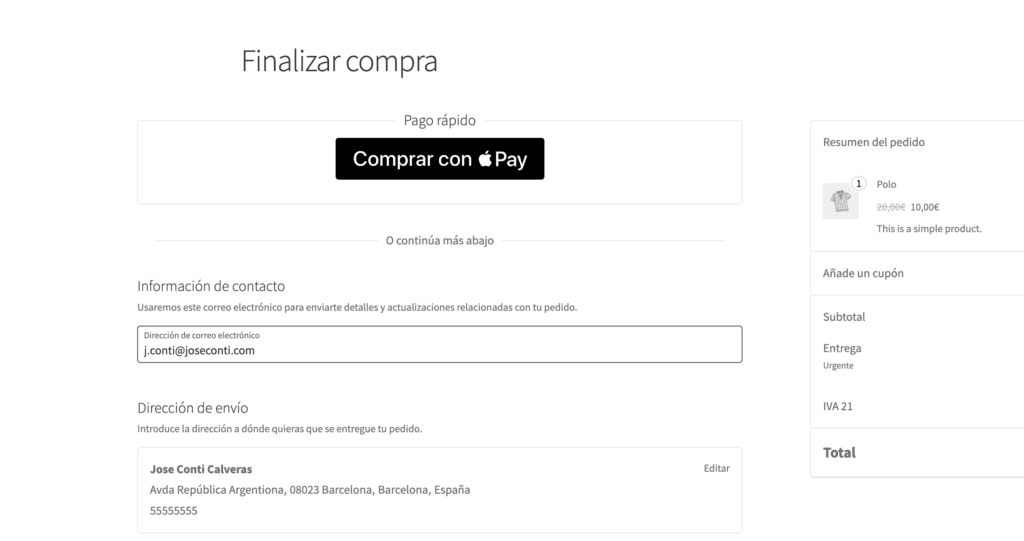
Apple Pay Payment from any browser and OS.
Another difference of my plugin is that it is one of the few that offers Apple Pay for any browser and OS. An iPhone is needed for payment, but it is not tied to an Apple device and its Safari browser.

Free certificate for Apple Pay Payment
Users with a license can request from My account a certificate to use Apple Pay at no additional cost. For those who don't know, with Redsys you need to register with Apple Developers, which costs €99/year, in addition to acquiring a plugin that supports Apple Pay with Redsys. By purchasing the license for my plugin, I will personally provide you with the certificate so that you don't incur extra expenses.
PayGold
With the plugin, you can send PayGold links. You can generate these links from orders you have created manually from the admin, links to request tokens (it is important that in these cases you have the active group number enabled) or if you wish, you can enable in the settings to show it at checkout (payment page), so that the customer will be sent a link to their email to pay for the order. The links can be sent via email or SMS, except at checkout, where they can only be sent via email.
Direct Debits via Redsys
If you activate this method, and it is active in Redsys, when your customer arrives at Redsys, they will be asked for the account they want to debit. Redsys will store all your accounts until you download the file. You can download the file from the terminal administration and upload it (generally, this depends on your bank) to online banking, thus creating the direct debits. It should be noted that direct debits are NOT marked as paid automatically in WooCommerce, as Redsys does not send notifications each time a charge is made.
Bank Transfers through Redsys
Bank transfers through Redsys must always be from one bank to the same bank, that is, for the order to be marked as paid in WooCommerce, the customer belonging to your same entity will be sent to Redsys, where they will have a button to make the transfer, and upon pressing it, the online banking will open with everything already configured, they will pay, and once the transfer is made (since it is within the same bank, it is immediate), it will notify WooCommerce that it has been completed successfully. In the hypothetical case that the customer is not from your same bank, they will be shown the details to make the transfer, but the order will not be marked as paid in WooCommerce even if they complete it.
Block for Gutenberg
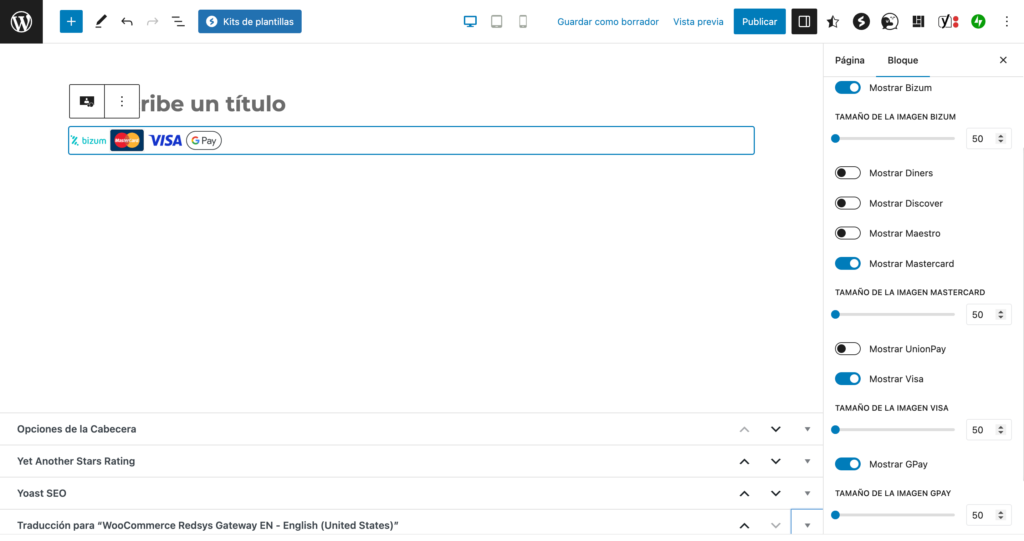
The plugin adds a block to Gutenberg with which you can display the payment methods you use on the payment page, activating or deactivating as needed. Thanks to this block, you can use it anywhere Gutenberg is present in your store.
Security Measures
The plugin has several security measures that can be activated, such as if a customer arrives at the thank you page after payment and the order has not been marked as paid, it will send an email to the site administrator to notify them of this situation and will inform the customer that the store is aware of the possible problem so that they do not get scared seeing that the order is still pending payment.
Fallback to email (PHP 8.1 or higher)
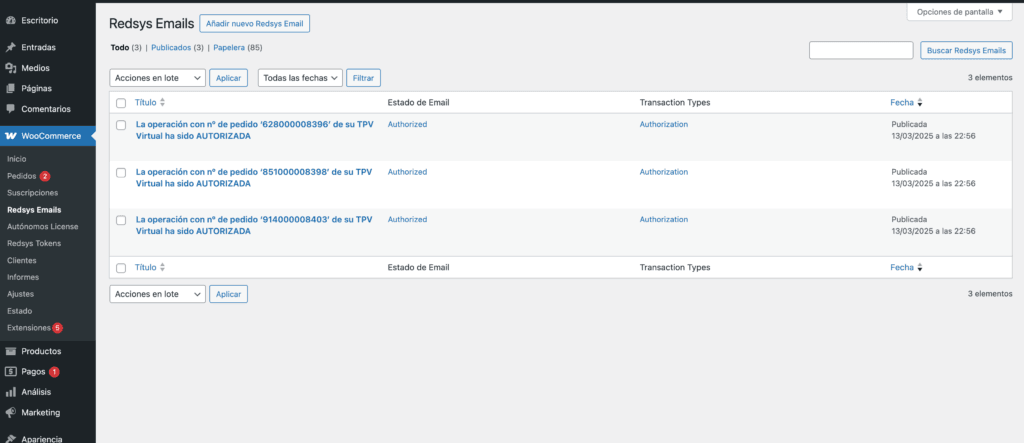
The plugin allows you to configure the email to which Redsys sends confirmation emails. In the event that the plugin is configured, it will check every five minutes if an email has arrived from Redsys with a payment confirmation. If it has arrived, it will check whether the order has been marked as paid or not, and in the event that it has not been, it will mark it as paid. No more orders that are not marked as paid and canceled.
Two encryption phrases (SHA256)
There are two spaces to add encryption phrases, one for real and another for testing. This may seem trivial, but it goes hand in hand with the following functionality.
Run in test environment for user
Thanks to this functionality, you can make all customers continue to buy normally, but for certain users that we will select, the terminal will operate in test mode. For example, let's say you are testing a new subscription product or pre-authorizations, but you haven't sold anything of this type yet. It is best to conduct tests on the site, but you do not want to be paying and making returns. You can create the products in private mode and put your user (or a test one) in test mode, so that while all customers continue to buy normally, you can perform all the tests you need on the test terminal.
Show to these users (test mode).
If we are implementing a new test method on our site, you also won't want everyone to see it while you conduct the necessary tests, so you can configure the method, mark that you want it in test mode, and also mark that you want only certain users to see it, selecting these users. This way, you can conduct all the tests you want on the new method without making noise on your payment page. Your store will continue to function normally without accidentally having any user select the payment method that you are still configuring and testing.
Measures for direct redirection from Redsys
In Redsys, you can activate that the customer is redirected directly from Redsys after payment without having to press any continue button. When this is activated, Redsys requests that a series of data be displayed on the site. All this data is shown on the thank you page after payment, fulfilling all the requirements of Redsys so that you do not have problems.
Control of saved/tokenized cards
The plugin offers options to send emails to users when their cards are about to expire and options to remove expired cards notifying your customer that they need to add a card if they do not want to lose the service.
Error Control 172, 173, and 174 from MasterCard
The plugin controls errors 172, 173, and 174 that MasterCard may return. In the event that they are returned, the plugin performs the actions required by MasterCard. Failing to perform these actions can result in significant penalties from MasterCard and the bank to the merchant.
QR Codes
Generation of QR codes in products. You can use these QR codes anywhere. They are highly customizable codes, including background images.

Push Notifications
If there is any error, the plugin can send Push notifications to your mobile phone so you are immediately aware of any issues. We all want to have maximum control over our business, especially regarding problems.
Sequential Invoice Number
If you wish, you can use the sequential invoice number integrated into the plugin. This functionality will create sequential numbers for each correct payment regardless of the payment method. This feature is useful if you have external accounting software and want to import all orders for accounting management. Important, it does not generate PDF invoices.
Update from WordPress
Update from your own WordPress with each release, which usually happens every couple of weeks. As a general rule, I release a new version each month with new features.
Premium Support
As a general rule, I usually respond within a few minutes, although I may be busy at that moment with something that prevents me from responding, and the wait may be a bit longer, but very rarely will you have to wait until the next day for a response, unless you write to me very late.
Options for Multisite
The plugin is 100% compatible with WordPress Multisite and comes with specific settings for Multisite, such as allowing all merchants to use the same configuration as the main site (which can be defined by a constant indicating which is the main site), or if the subsites can override the configuration created by the main site. Obviously, all sites can be kept separate with no connection between them, each with its own configuration.
Also developed by and for developers
The plugin is full of hooks and filters that will delight any developer. Practically any functionality or text can be modified through all the hooks (actions and filters) it has integrated. If you are a developer or work with one, you will surely find them very useful.
The plugin also has its own API that can be used externally, making it much easier to extend functionalities through all the hooks or the implementation of external tools.
Support, installation, testing, and setup included in the license
One of the most complex issues with Redsys is setting up the gateway correctly. The price of the license includes support, installation, all necessary testing according to your needs and Redsys requirements, and in case something is not correct due to some configuration in the terminal, I will provide you with all the guidelines and exactly what you should request from support via email to ensure everything works, you can even add me to the email thread with support so I can talk to them. I have no problem doing this, that's what I'm here for. I have done it hundreds or perhaps thousands of times.





Reviews
There are no reviews yet.