Introduction to Agentic Coding with AI
Artificial Intelligence (AI) has changed the way we conceive software development. It is no longer just about asking a system to complete a line of code: today we can work with agents that understand goals, follow conventions, maintain living documentation, and collaborate with us similarly to another team member. We will call this approach “Agentic Coding.” This extensive and practical guide will explain how to move from idea to a professional flow where AI integrates into your daily life as a developer, focusing on WordPress and a real process that you can replicate in your projects.
You will find, on one hand, the conceptual basis necessary to understand modern AI and the role of LLMs (Large Language Models). On the other hand, you will see how to organize work with key files that articulate the entire process: AGENTS.md (rules and scope), TODO.md (the agent’s board), and Documents.md (living documentation). Additionally, we include best practices, real limitations, and a practical example section that will serve as a project skeleton, with clearly marked spaces for later incorporating concrete technical content (code, structures, etc.) in collaboration with your implementation agent.
1. Introduction
1.1. What is Artificial Intelligence (AI) in development?
AI is a broad discipline that aims for machines to perform tasks we associate with human intelligence: understanding natural language, reasoning from descriptions, learning from data, or planning actions. After decades of advancements, the recent qualitative leap comes with Large Language Models (LLM). These models are trained with massive volumes of text, learn language patterns, and acquire the ability to generate instructions, explanations, and, by extension, code coherent with a given context.
In the realm of development, this means we no longer depend on tools that suggest tokens on the fly. We can describe high-level goals, impose style standards, request consistent documentation, and coordinate tasks. The value is not just in “autocomplete,” but in structuring sustained technical work over time with the help of an agent that understands the project.
1.2. From point assistants to agents
The first contact of many programmers with AI came through point assistants: suggestion engines in the IDE, chatbots capable of answering questions or generating standalone functions. Useful, yes, but limited when we want to build systems with coherence over weeks or months. In contrast, the Agentic Coding approach leverages the models’ ability to follow processes, maintain operational memory (through files and conventions), and navigate a backlog in a planned manner. In other words, we move from reactive assistance to proactive collaboration guided by project artifacts.
1.3. Why is AI not “just chatbots”?
The image of the “chatbot that answers questions” falls short. For development, modern AI can:
- Generate and refactor code following architectural patterns, naming conventions, and standards (PHPCS, ESLint, etc.).
- Design and implement tests (unit and integration) and propose edge cases.
- Write and maintain technical and user documentation while developing, not at the end.
- Automate repetitive tasks of integration, API migration, translations, and comments in code.
- Explore technical options with reasoned comparisons (performance, security, maintenance).
1.4. Operational definition of Agentic Coding
We will call Agentic Coding a workflow in which the human developer defines rules, goals, and standards, and an agent (e.g., Codex) operates within that framework to execute tasks, propose subtasks, open Pull Requests, maintain a living work board, and document what has been built. Your role changes: you move from coding each line to directing the system, specifying acceptance criteria, reviewing PRs, and resolving blockages or ambiguities with the help of an idea co-pilot (for example, ChatGPT to refine the process design or draft artifacts like AGENTS.md).
2. AI Work Ecosystem for Developers
2.1. Cloud, local, and hybrid
There are three main ways to consume models:
- Cloud (OpenAI, Anthropic, Google): ease of use, automatic scaling, reasonable latency, and state-of-the-art models using CLI if you want it locally. Disadvantages: variable cost and data policies. There is also the possibility of using, for example, Codex from OpenAI, which has a fixed cost depending on what you contract; with Plus ($20/month) it is usually sufficient. Here I will talk about Codex.
- Local (Llama.cpp, Ollama, vLLM): control and privacy, minimal third-party dependency, and very low usage costs. Disadvantages: you need powerful GPU/CPU and model maintenance.
- Hybrid: clouds for production and local models for experimentation, internal testing, or sensitive data. It is usually the most practical balance.
2.2. Selection criteria
Your decision will depend on:
- Privacy: Are you dealing with sensitive data? Local or hybrid may be preferable, although in theory privacy is now ensured in the cloud if configured accordingly.
- Cost: Will the project grow in usage? The cost per token in the cloud can rise; locally you pay for the infrastructure.
- Startup speed: the cloud wins if you want to start today with minimal friction.
- Operation and maintenance: local requires more DevOps; cloud externalizes complexity.
2.3. Complementary tools
- Repository: GitHub/GitLab/Bitbucket for PRs, issues, reviews.
- Editor: VSCode, with extensions for standards (PHPCS, ESLint), formatters (Prettier), and assistants.
- CI/CD: automated tests, linters, and controlled deployment.
- Task management: although TODO.md will be maintained by the agent, it is useful to integrate signals with tagged issues for auditing.
3. Preparing the foundation of the workflow
3.1. The trio that articulates the system
In this approach, your process is sustained by three synchronized artifacts:
- AGENTS.md: rules of the game. Defines purpose, scope, standards, structure, conventions, security criteria, quality requirements, and documentation expectations. If you want more information about AGENTS.md, you can obtain it here.
- TODO.md: living task board. Created and maintained by the agent. It shows what will be done, what is in progress, and what has been completed. It also adds new emerging tasks.
- Documents.md: living documentation of what has already been built: public API, functions, classes, hooks, data schemas, flows, and usage recipes. It is also maintained by the agent as it progresses.
3.2. Clear roles
- You: architect and quality manager. Set rules and objectives in AGENTS.md, review PRs, resolve ambiguities, request corrections and new tasks if you detect gaps.
- Implementation agent (Codex): executes, decides the operational breakdown in TODO.md, makes incremental PRs, and records documentation in Documents.md.
- Idea co-pilot (ChatGPT): helps you refine AGENTS.md, reason alternatives, draft acceptance criteria, and unblock complex problems by reviewing code when necessary.
3.3. Disciplined iteration
Success does not depend on “the AI that generates a lot of code,” but on a disciplined iteration with cycles of: plan (you), execute (agent), review (you), document (agent), and re-plan. The smaller and more verifiable each step is, the better the system responds, the lower the risk of technical debt, and the easier it is to audit the work.
4. AGENTS.md: contract and editorial line of the project
4.1. Strategic function of AGENTS.md
AGENTS.md is the compass of the project. Here you set the intention, scope, and limitations. Additionally, you establish the editorial line of the code: style, names, structure, security, and documentation. It is the document that prevents the agent from improvising outside your standards. Think of it as the “Guide for contributors” adapted to a collaborator that is AI.
4.2. Recommended content
- Objective and scope: what problem you solve, what the project will not do, and the expected outcome.
- Standards: WordPress Coding Standards, PHPCS, translations with specific domain, mandatory docblocks.
- Security: sanitization, escaping, nonces, minimum roles and capabilities, handling personal data.
- File structure: directory tree and responsibilities by file/class.
- Naming conventions: function prefixes, classes, script and style handles.
- Acceptance criteria: what you consider “done” in each task, how it is tested, and what evidence is valid.
- Documentation expectations: how Documents.md is maintained and when it should be updated.
4.3. Direct benefit
With a good AGENTS.md, your agent’s PRs show extreme coherence: same conventions, same structure, same secure practices. Your review is faster, the project is more maintainable, and the onboarding of third parties is easier.
5. TODO.md: the board managed by the agent
5.1. A fundamental change of control
In this flow, YOU do NOT write the TODO.md. The agent creates and maintains it from the first commit. This means that the agent:
- Defines the breakdown of tasks and the order of execution.
- Moves items between states: pending, in progress, completed.
- Adds emerging tasks when it detects new needs or risks.
What do you do then? You set the course in AGENTS.md, review PRs, and if you detect gaps, ask Codex to add tasks to TODO.md. In this way, the board reflects how the agent itself understands and plans the work, without you having to micromanage it.
5.2. Advantages of this approach
- Operational autonomy: you delegate the orchestration of tasks while retaining strategic control.
- Transparency: TODO.md becomes an auditable record of the agent’s decisions.
- Agility: new tasks are incorporated immediately as they arise during development.
6. Documents.md: living technical memory
6.1. What it is and why it matters
Documents.md is not a manual written at the end. It is a living knowledge base that the agent updates as it develops. It should record the public surface of the project: classes and methods, functions, shortcodes, hooks (actions/filters), data schemas, key flows, and practical recipes. The maxim is simple: if it is not in Documents.md, it is as if it does not exist for third parties.
6.2. Everyday use
When you return to the project after days or weeks, you do not need to trace code. You open Documents.md and find:
- What the function you need is called and what parameters it accepts.
- What filter you need to hook to modify a behavior.
- What columns are in a table and what indexes are defined.
- How to extend or reuse a flow with a minimal viable example.
6.3. Update policy
- Every PR that changes the public surface must include an update to Documents.md.
- If an API is added, a reproducible usage example must be included.
- If the data schema is modified, the migration and its justification must be noted.
7. Best practices of Agentic Coding
7.1. Scrupulousness with standards
Maintain consistency: WordPress Coding Standards with PHPCS, clear docblocks, i18n in English (and translations where appropriate), and predictable nomenclature. An agent performs better when the rules are clear and applied uniformly.
7.2. Security by default
- Sanitize inputs with appropriate functions (
sanitize_text_field,sanitize_email, etc.). - Escape outputs in HTML (
esc_html,esc_attr,wp_ksesif HTML is allowed). - Nonces in forms and server-side verification.
- Principle of least privilege in roles/capabilities.
7.3. Small and verifiable tasks
Break down work into deliverable units that you can review in minutes. Ask the agent for small PRs with a single intention. This reduces errors, speeds up reviews, and favors the system’s incremental learning.
7.4. Clear acceptance criteria
In AGENTS.md, define “Definition of Done” for types of tasks: for example, “a functionality is ready when:
- When it passes PHPCS.
- Includes basic tests or manual verification steps.
- Updates Documents.md.
- Has correct i18n.
7.5. Parallel documentation
Require the agent to update Documents.md in the same PR that introduces functional changes. This avoids desynchronization and reduces friction.
7.6. Continuous auditing
Every certain number of PRs, make “milestones” of cross-review: repo structure, dependencies, performance, security, documentation coverage. If you detect degradation, reinforce AGENTS.md and open corrective tasks (which the agent will transfer to TODO.md).
8. Limitations and operational realism
8.1. Context dependency
LLMs have contextual limits. The agent does not “see” the entire repo at once; its performance improves when you work in bounded iterations, with artifacts that fix memory (AGENTS.md, Documents.md) and with small PRs.
8.2. Ambiguity and its cost
If your requirements are vague, the agent will tend to fill gaps with assumptions. Result: reworks. Solution: define objectives, constraints, and examples. Initial clarity saves entire cycles.
8.3. Plausible errors
AI can generate “plausible but incorrect” code. Reduce this risk with linters, basic tests, and human reviews. Remember: the human role does not disappear; it elevates to curator and architect.
8.4. Scope changes
Living projects evolve. The agent manages it better if you train it to propose new tasks in TODO.md when it detects collateral impacts, and you validate that proposal before executing.
9. Practical example: skeleton of the project “Simple
Contact Shortcode & Block
To connect theory with real implementation, we will anchor a simple project in WordPress that will serve as a demonstration of the Agentic Coding flow. At this point, we will not include the final code (we will work on it later with your agent). Instead, we will leave the structural containers and visible spaces where we will insert the artifacts and technical pieces when they are ready. This way, you can publish the guide today and, step by step, complete the example without rewriting the entry.
9.1. Plugin Objective
The “Simple Contact Shortcode & Block” plugin will provide a very basic contact form (Name and Email) that can be added to any page in two ways: via a shortcode and via a Gutenberg block. When the form is submitted, it will save the data in its own table in the database and notify the site administrator by email.
9.2. Expected Directory Structure
/simple-contact/
├─ simple-contact.php              # Plugin bootstrap
├─ uninstall.php                   # Cleanup on uninstall
├─ includes/
│  ├─ class-sc-database.php     # Schema and CRUD
│  ├─ class-sc-form.php         # Render + submission
│  └─ class-sc-block.php        # Block registration
├─ assets/
│  ├─ css/style.css             # Frontend styles
│  └─ js/block.js               # Block logic
└─ languages/
   └─ simple-contact.pot        # Translation template
9.3. Agentic Flow Artifacts
- AGENTS.md will set the rules and implementation expectations.
- TODO.md will be created and maintained by Codex. Here, the backlog and prioritization decided by the agent will appear.
- Documents.md will grow with the catalog of APIs, hooks, and flows as they are implemented.
9.4. Files
As we have mentioned, we need to create an AGENTS.md file that will be what Codex follows.
What needs to be done is to have a clear idea of what is desired; once everything is clear and there has been “talking” with ChatGPT about the entire project, we ask it to create an AGENTS.md with all the rules and defining the project.
Okay, now we are going to create the AGENTS.md with everything we have discussed so that Codex has an exact guide on what it needs to do and how.
I need you to create the entire AGENTS.md correctly and completely for the project.
You must include the entire file structure, follow all WordPress security standards, all security measures, file names, prefixes in files, classes, functions, etc. standardized, headers and comments in all files, functions, routes, and methods as specified by WordPress. All strings must be in English and translatable. It is very important that PHPCS is always passed while maintaining all alignments with their tabs and spaces.
You must also mention and explain exactly the use of TODO.md and Documents.md so that they are used from the beginning and do not have to be done later. Specify that if a file is very large, as can happen in a translation file, it should be created in different PRs so that it can always create PRs and not find itself unable to do so due to size.
The repository must also have the .gitignore` (development junk and OS files) .gitignore and
.gitattributes so that only what should be in the final packaging arrives and unnecessary files from the OS on which it is working do not reach the repo.Create the AGENTS.md in English.
After this prompt, ChatGPT returns the content that I will need to paste into the AGENTS.md
# AGENTS.md — Simple Contact Shortcode & Block

## Project Objective
Create a WordPress plugin named **Simple Contact Shortcode & Block** that exposes a simple contact form as:
- A shortcode: `[simple_contact]`
- A Gutenberg block: `simple-contact/form`

The form collects **Name** and **Email**, saves submissions into a custom database table, and sends a notification email to the site administrator. The plugin must strictly follow WordPress Coding Standards and security best practices. All code and documentation must be in **English**, and all user-facing strings must be **translatable** using the **text domain `simple-contact`**.

---

## Non-Negotiable Standards

1. **Coding Standards & PHPCS**
   - Must pass **PHPCS** with the official WordPress Coding Standards ruleset.
   - **Tabs for indentation**, **spaces for alignment**. No trailing whitespace.
   - Consistent array formatting, parameter alignment, and inline documentation.
   - No unused imports, dead code, or commented-out blocks left behind.

2. **Documentation Discipline**
   - Every PHP file: header PHPDoc describing purpose, package, since, and author.
   - Every class, method, and function: full docblocks (summary, `@param`, `@return`, `@since`, `@see` when relevant).
   - Inline comments for non-obvious logic and security-relevant branches.
   - All docs and comments in **English**.

3. **Security**
   - **Input sanitization**: use the correct sanitizers (`sanitize_text_field`, `sanitize_email`, `absint`, `sanitize_key`, `wp_unslash`, etc.).
   - **Output escaping**: use `esc_html`, `esc_attr`, `esc_url`, or `wp_kses` (with strict allowed HTML) right before rendering.
   - **Nonces**: all form submissions must include a nonce and be verified server-side with `check_admin_referer`.
   - **SQL safety**: use `$wpdb->prepare()` for all SQL with untrusted input.
   - **Capabilities**: any admin action or page must check appropriate capabilities (e.g., `manage_options` or a custom capability).
   - **No secrets in repo**: no API keys or secrets committed.
   - **No PII leaks**: never echo raw user input; log carefully (avoid sensitive data).

4. **Internationalization (i18n)**
   - All user-facing strings must be wrapped with translation functions: `__()`, `_e()`, `esc_html__()`, `esc_attr__()`, etc.
   - Text domain: **`simple-contact`**.
   - Provide `/languages/simple-contact.pot` and keep it updated.

5. **Pull Request (PR) Policy**
   - PRs must be **small, focused, and self-contained**.
   - If a change involves **very large files** (e.g., `.pot`, vendor bundles, generated assets), **split into multiple PRs** so PRs remain reviewable and pass size limits.
   - Every PR must:
     - Pass **PHPCS**.
     - Update **Documents.md** if it touches public surface (APIs, hooks, schema, UI strings).
     - Update **TODO.md** (maintained by Codex) to reflect what moved to “Completed” and any newly discovered tasks.
     - Include clear testing/verification notes.

---

## Repository Hygiene: .gitignore and .gitattributes

To ensure clean source control and clean release packages:

### 1) `.gitignore` (development junk and OS files)
Codex must create a `.gitignore` at repo root including (at minimum):

OS files

.DS_Store
.DS_Store?
Thumbs.db
ehthumbs.db
Icon?
._*

IDE/editor

.vscode/
.idea/
*.iml

Node / frontend builds

node_modules/
npm-debug.log*
yarn-error.log
dist/
build/

PHP / tooling

vendor/
composer.lock

Logs & temp

*.log
*.tmp
*.cache

Coverage / reports

coverage/
.clover
.phpunit.result.cache

If the project later adopts Composer or a build step, extend accordingly.

### 2) `.gitattributes` (control what goes into release packages)
Codex must create a `.gitattributes` at repo root to **exclude non-distribution files** from exported archives (GitHub “Download ZIP”, composer dist, etc.). Use `export-ignore` rules. At minimum:

/.gitattributes export-ignore
/.gitignore    export-ignore
/.github/      export-ignore
/.vscode/      export-ignore
/.idea/        export-ignore
/tests/        export-ignore
/docs/         export-ignore
/.editorconfig export-ignore
/phpcs.xml*    export-ignore
/phpmd.xml*    export-ignore
/phpunit.xml*  export-ignore
/CHANGELOG.md  export-ignore
/README.md     export-ignore
/CONTRIBUTING.md export-ignore
/package.json  export-ignore
/package-lock.json export-ignore
/yarn.lock     export-ignore
/webpack.*     export-ignore
/rollup.*      export-ignore
/vite.*        export-ignore
/node_modules/ export-ignore
/src/          export-ignore

Adjust the list as the toolchain evolves. The goal: **the release ZIP must only include what WordPress needs to run the plugin** (PHP in `includes/`, main bootstrap, assets built for runtime, languages). OS files like `.DS_Store` and Windows metadata must never appear in packages.

---

## File & Naming Conventions

### Directory Structure

/simple-contact/
├─ simple-contact.php              # Main plugin bootstrap (hooks, constants, loaders)
├─ uninstall.php                   # Cleanup on uninstall
├─ includes/
│  ├─ class-sc-database.php        # DB schema + CRUD
│  ├─ class-sc-form.php            # Form render + submission handler + shortcode
│  └─ class-sc-block.php           # Gutenberg block registration + asset logic
├─ assets/
│  ├─ css/style.css                # Frontend styles (scoped to plugin classes)
│  └─ js/block.js                  # Block editor script (registered via block.json)
├─ languages/
│  └─ simple-contact.pot           # Translation template (exported for translators)

### Class Names
- Prefix: `SC_`
- Examples: `SC_Database`, `SC_Form`, `SC_Block`

### Global Function Names
- Prefix: `sc_`
- Example: `sc_render_form()`

### Script & Style Handles
- Prefix: `sc-`
- Examples: `sc-frontend`, `sc-block-editor`, `sc-block-style`

### PHP File Headers
Each PHP file must start with a PHPDoc header block:
- Summary line (what this file does).
- `@package` plugin slug (e.g., `simple-contact`).
- `@since` version string.
- Optionally `@author`.

### Method & Function Docblocks
- One-line summary, a blank line, then detailed description if needed.
- `@param` for each parameter with type and description.
- `@return` with type and description.
- `@since` tag.

---

## Required Files: Responsibilities & Content

### 1) `simple-contact.php`
- **Plugin header**: Name, Description, Version, Author, License, Text Domain, Domain Path.
- **Constants**: `SC_PLUGIN_VERSION`, `SC_PLUGIN_FILE`, `SC_PLUGIN_DIR`, `SC_PLUGIN_URL`.
- **Load text domain** in `plugins_loaded`.
- **Includes**: require `includes/class-sc-database.php`, `includes/class-sc-form.php`, `includes/class-sc-block.php`.
- **Activation hook**: create DB table via `SC_Database`.
- **Deactivation hook**: no destructive action; keep data unless uninstall.
- **Bootstrap**: instantiate singletons or initialize hooks.

### 2) `uninstall.php`
- Verify `defined( 'WP_UNINSTALL_PLUGIN' )`.
- Drop custom table.
- Delete plugin options (if any).
- Leave no orphaned data created by the plugin (besides posts/users not owned by plugin).

### 3) `includes/class-sc-database.php`
- Singleton pattern (`SC_Database::instance()`).
- `create_table()` with `dbDelta()` for initial schema.
- Versioned migrations (if schema evolves) with an option `sc_db_version`.
- CRUD:
  - `insert_contact( array $data ): int|WP_Error`
  - `get_contacts( array $args = []) : array`
- Strict sanitization at boundaries and `$wpdb->prepare()` everywhere.
- Store timestamps in **UTC**.

### 4) `includes/class-sc-form.php`
- Singleton pattern (`SC_Form::instance()`).
- Rendering method: `render_form( array $atts = []) : string`
  - Attributes: `success_message` (string), `css_class` (string).
  - Output escaped and HTML well-formed.
- Submission handler: `handle_submission(): int|WP_Error`
  - Verify nonce.
  - Sanitize inputs.
  - Validate email with `is_email()`.
  - Insert via `SC_Database`.
  - Send email to admin (filterable).
- Shortcode registration: `[simple_contact]` mapping to render method.
- Hooks:
  - Actions: `sc_before_insert_contact`, `sc_after_insert_contact`
  - Filters: `sc_email_to`, `sc_email_subject`, `sc_email_headers`, `sc_success_message`

### 5) `includes/class-sc-block.php`
- Registers block via `block.json`.
- Ensures attributes mirror shortcode attributes:
  - `successMessage` (string)
  - `cssClass` (string)
- Registers/enqueues editor script (`assets/js/block.js`) and frontend style (`assets/css/style.css`) using versioned handles.
- Server-side render may call `SC_Form::render_form()` for parity with shortcode.

### 6) `assets/css/style.css`
- Minimal, theme-friendly CSS.
- Scope under a unique wrapper (e.g., `.sc-form`) to avoid conflicts.

### 7) `assets/js/block.js`
- Block registration (edit + save).
- Inspector controls for `successMessage` and `cssClass`.
- Editor preview lightweight and consistent.

### 8) `languages/simple-contact.pot`
- Exported from sources, includes all translatable strings.
- If `.pot` is very large, split PRs to keep reviewability (do not skip updates).

---

## Database Schema

Table: `{$wpdb->prefix}sc_contacts`

| Column      | Type                              | Notes                                          |
|-------------|-----------------------------------|------------------------------------------------|
| id          | BIGINT UNSIGNED AUTO_INCREMENT    | Primary key                                    |
| name        | VARCHAR(120)                      | Sanitized via `sanitize_text_field()`          |
| email       | VARCHAR(190)                      | Validate with `is_email()`                     |
| created_at  | DATETIME                          | Stored in UTC                                  |
| consent_ip  | VARBINARY(16) NULL                | Optional (IPv4/IPv6 stored as binary)          |
| user_agent  | VARCHAR(255) NULL                 | Optional                                       |

Indexes:
- `PRIMARY (id)`
- `INDEX (email)`
- `INDEX (created_at)`

Migrations:
- Implement `maybe_upgrade_schema()` with version option to handle future changes.

---

## Shortcode Specification

- **Tag**: `[simple_contact]`
- **Attributes**:
  - `success_message` (string, optional; default localized string)
  - `css_class` (string, optional)
- **Example**:

[simple_contact success_message="Thank you, we will contact you soon." css_class="is-style-card"]

---

## Block Specification

- **Name**: `simple-contact/form`
- **Category**: `widgets`
- **Attributes**:
- `successMessage` (string)
- `cssClass` (string)
- Inspector controls must allow configuring both.
- Save attributes and ensure front end mirrors shortcode behavior.

---

## Actions & Filters (Public Surface)

**Actions**
- `sc_before_insert_contact( array $sanitized_data )`
- `sc_after_insert_contact( int $contact_id, array $data )`

**Filters**
- `sc_email_to( string $recipient, array $data )`
- `sc_email_subject( string $subject, array $data )`
- `sc_email_headers( array $headers, array $data )`
- `sc_success_message( string $message, array $data )`

Every time a new action/filter is added or changed, update **Documents.md** with signature, timing, and usage example.

---

## The Role of TODO.md (Maintained by Codex)

- `TODO.md` is **owned and maintained by Codex** from the first commit.
- Must include, at minimum, sections for **Pending**, **In Progress**, **Completed**.
- Codex decides task breakdown and order, moves items across states, and **adds new tasks proactively** when necessary.
- Human collaborators must **not** edit `TODO.md` directly; they request changes and Codex updates it.

---

## The Role of Documents.md (Maintained by Codex)

- `Documents.md` is a **living knowledge base** of what exists now:
- Quick navigation
- Architecture (modules and responsibilities)
- Data schema and migrations
- Public API (classes, methods, functions)
- Actions & Filters catalog
- Shortcode and Block usage
- Workflows (submission, uninstall)
- How-tos (extend/customize)
- Testing & QA
- Release notes (short); full details in `CHANGELOG.md`
- Glossary (prefixes, naming, terms)
- **Every PR** that changes public surface or behavior must update `Documents.md`. PRs lacking necessary docs updates must be rejected.

---

## Testing & QA

- Manual verification steps must be described in PRs (form renders, nonce verified, invalid email rejected, success path stores row and sends email, uninstall cleans).
- Where applicable, include basic automated tests or reproducible steps.
- Accessibility: form labels/ids, button text, error messages readable and localized.
- Performance: avoid unnecessary queries; enqueue only when needed.

---

## Release Packaging Policy

- The **distributed ZIP** (WordPress plugin package) must contain only runtime necessities:
- `simple-contact.php`, `uninstall.php`, `/includes/`, built `/assets/` for runtime, `/languages/`.
- **Exclude** development artifacts (tests, CI, editor configs, node_modules, src, docs) via `.gitattributes` `export-ignore`.
- OS junk files (e.g., `.DS_Store`, `Thumbs.db`) must never appear.
- If a build pipeline is introduced, ensure built assets are included and sources excluded as per policy.

---

## Final Operational Rules (for Codex)

- Always write **English** code comments and docs.
- Always wrap user strings with i18n functions using `simple-contact` text domain.
- Always sanitize input and escape output at the last responsible moment.
- Always pass **PHPCS** and respect tab/space conventions (tabs indent, spaces align).
- Keep **PRs small**; split large assets/changes across multiple PRs.
- Update **TODO.md** and **Documents.md** in lockstep with code changes.
- Maintain `.gitignore` and `.gitattributes` so that the repo stays clean and the release ZIP is minimal and compliant.

Failure to follow any of the rules in this AGENTS.md is grounds to request changes or reject the PR.
Note that in the prompt I did not mention what I want the plugin to do, as ChatGPT already knows it from all the previous conversation I had with it and everything we have been discussing has drafted this AGENTS.md which is super complete, something that if I wanted to do it myself would be more complicated because it is not just about leaving something out, but ChatGPT also knows how things need to be said, so it drafts an AGENTS.md according to its needs. That is why it is so important to talk to it, so that it is also clear about everything you want.
Now we must create the repository on Github if we do not have it. So we will create it. Let’s go to Github and create a new repository which can be public or private, in my case I will create this one public so that you all have access to it.
The first thing we should do is bring the repository to local, we can use for example GitHub Desktop which is available for all OS.
Once we have it locally, we will create the AGENTS.md file by pasting into it what ChatGPT has told us.
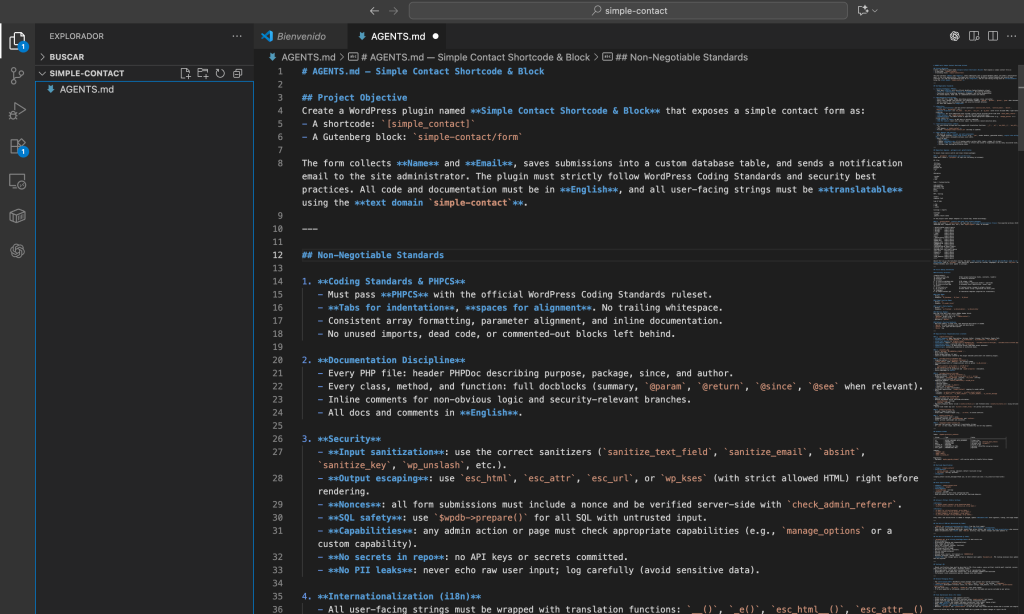
and we will upload it to Github, using Github Desktop.
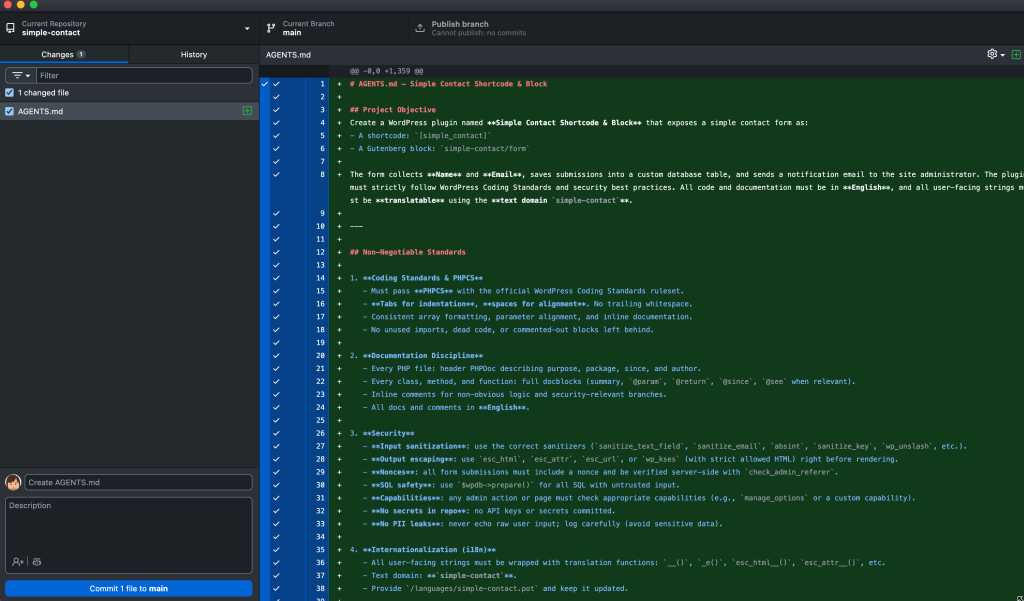
Once uploaded, we can see on Github that we have the AGENTS.md file in our repository. We no longer need anything else to start with Codex.
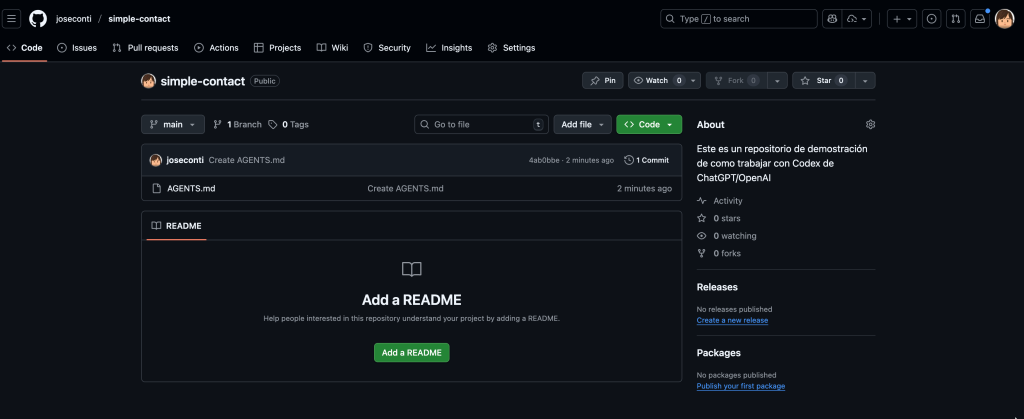
Now we will go to Codex and the first thing we need to do is add this repository (if it is your first time accessing Codex, it will ask you to give access permissions to your Github account).
We will just click on create environment, and we will configure it.
The basic part will be configured like this by selecting the repository.
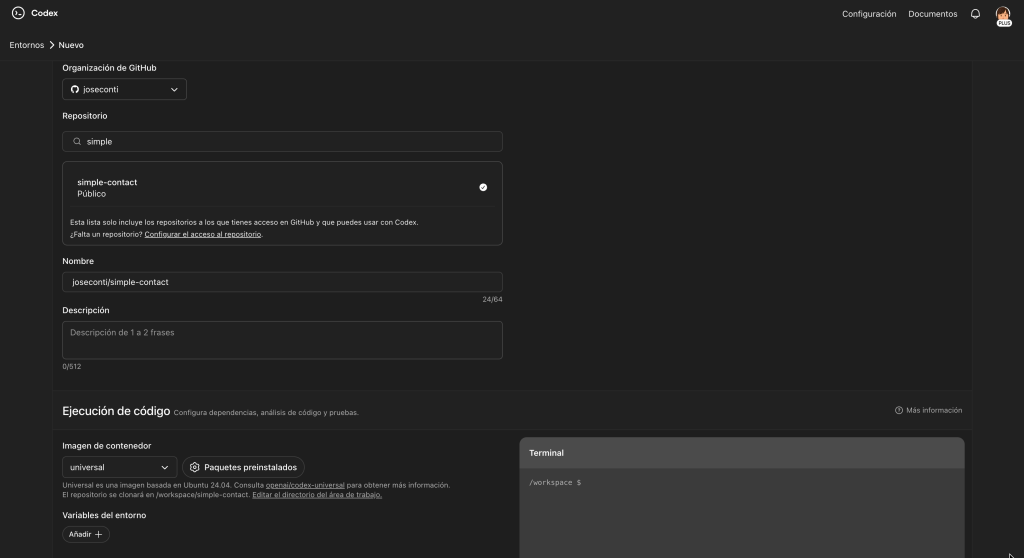
But notice this last part. It is often necessary to set it this way, as it needs packages to compile React for example, if it is not left anything, it will not be able to do it, but you can always activate and deactivate this option, as it can be changed.
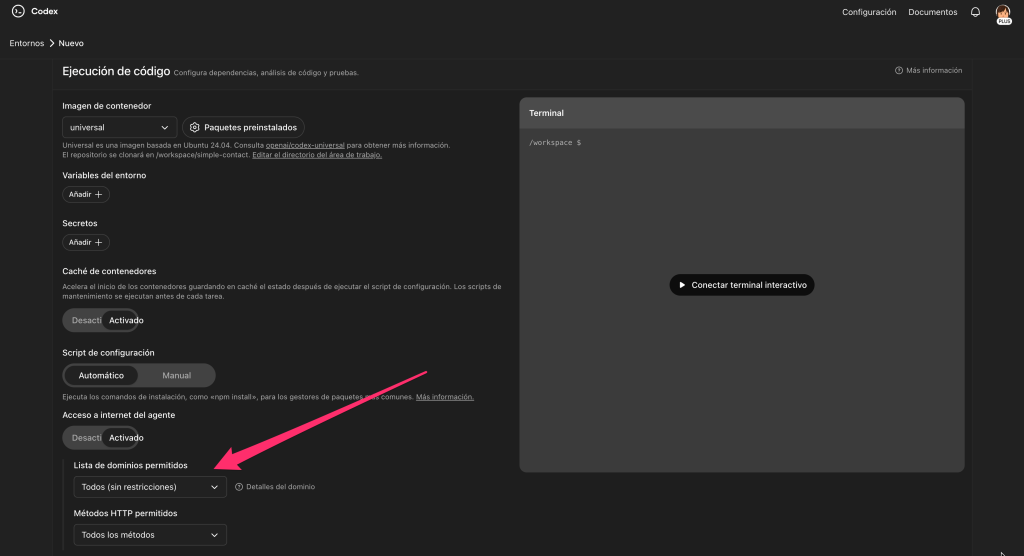
Now we just need to click on Create environment.
Once we have created the environment, we just need to start making Codex work. We select in Codex the repository we want to work with, you can leave the other as it is.
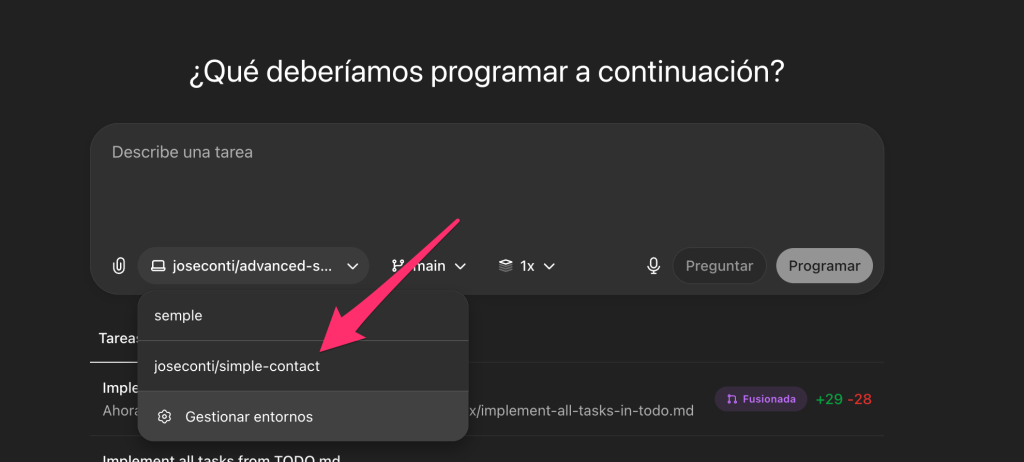
And once selected, you just need to make a prompt as simple as this
Develop everything in AGENTS.md and remember to use the TODO.md and Documents.md
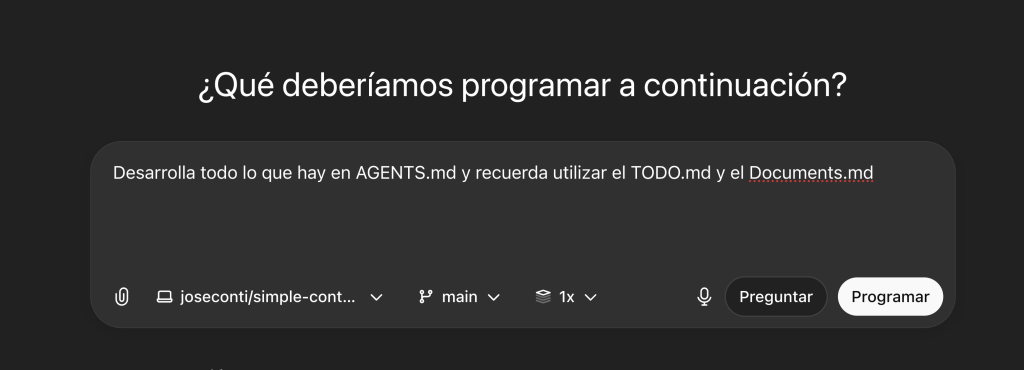
And we will click on Schedule, and it will start working on the code.
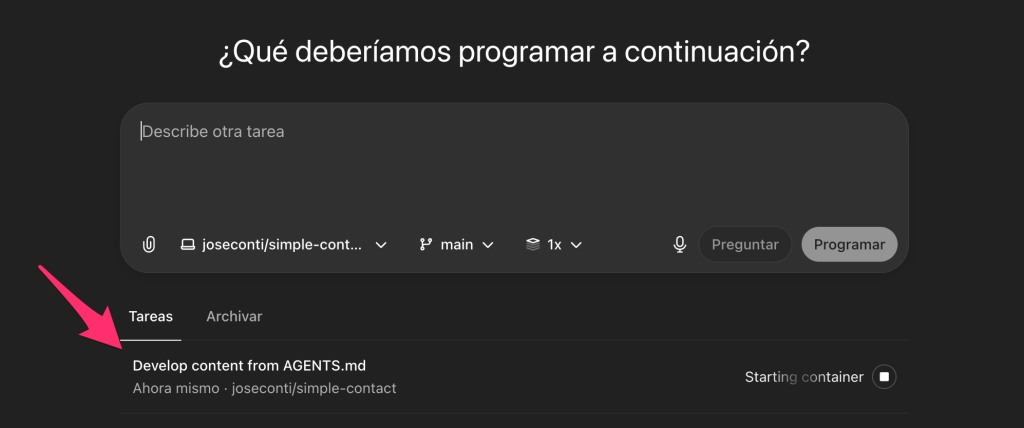
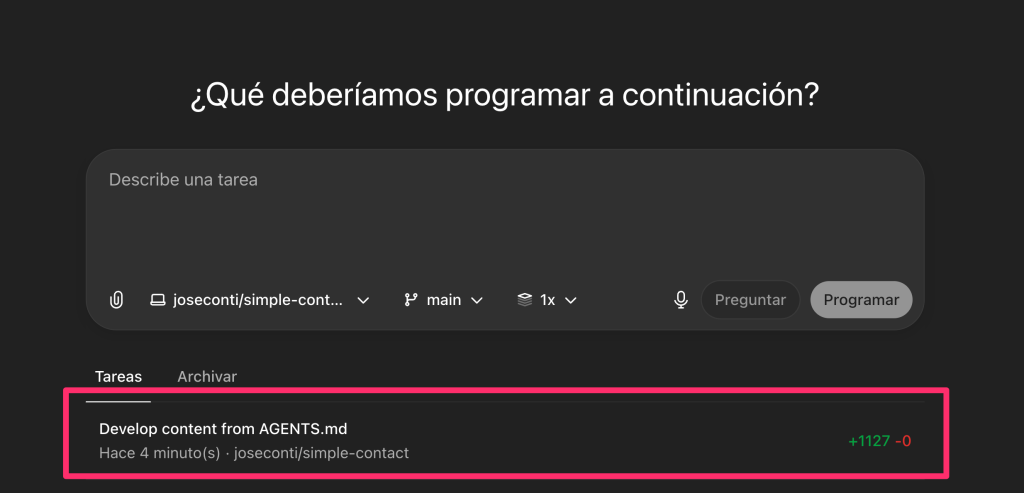
After a while, depending on everything it has done, it will show us all the changes it has made, which in this case, is all code to add.
By clicking on the task, we will access it and be able to see everything it has done, review it, and create the PR or request changes.
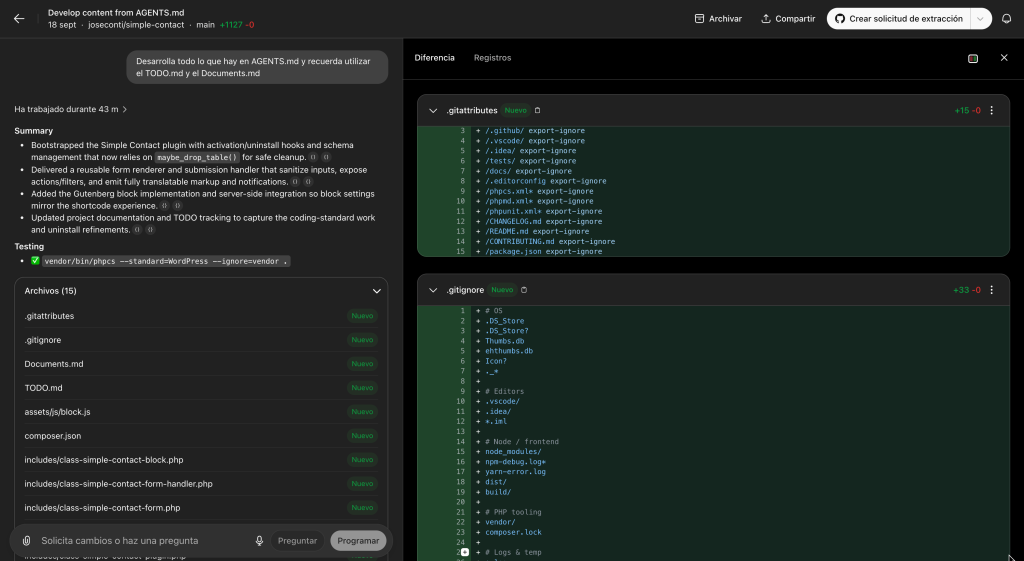
In this case, I am not going to review anything because this is a demo, so I first click on “Create pull request” and then on “View PR” once the button appears.
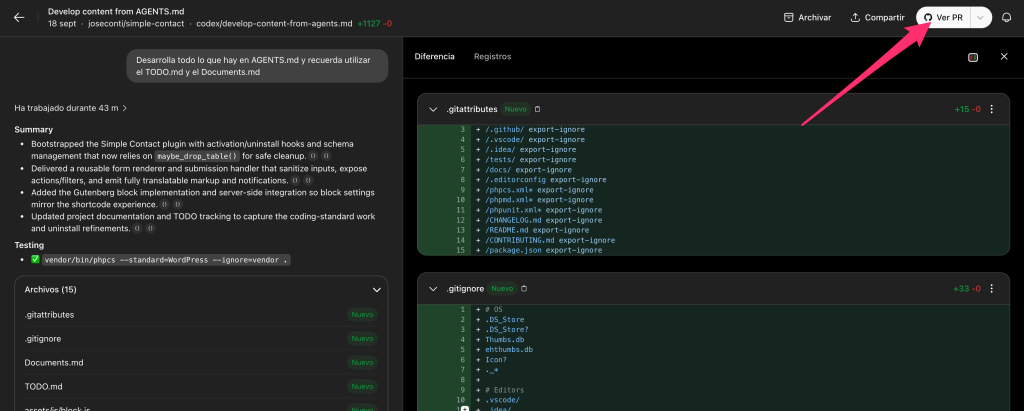
This will take us to Github, where we can also review the changes and accept them.
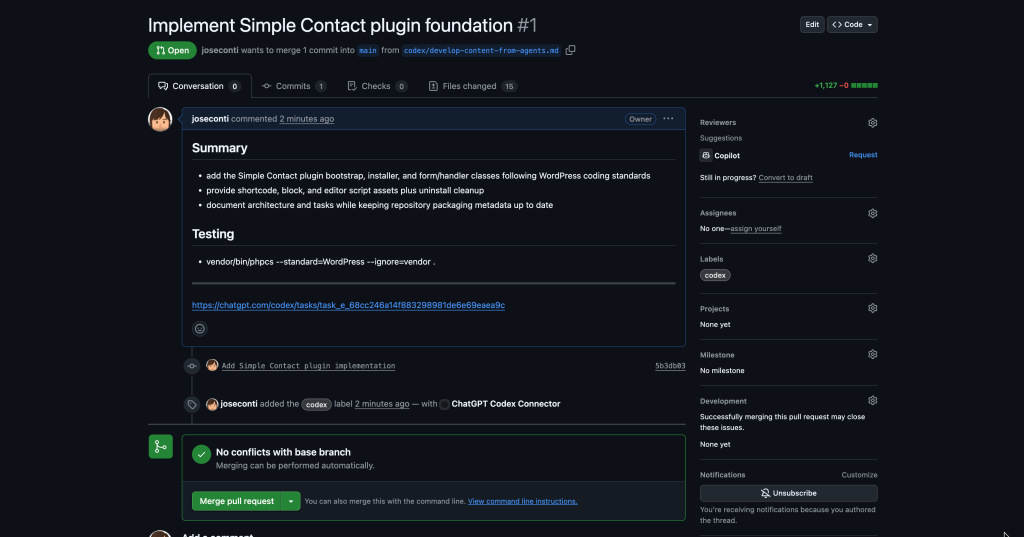
We will click on “Merge pull request” and we will have all the new code added to the plugin.
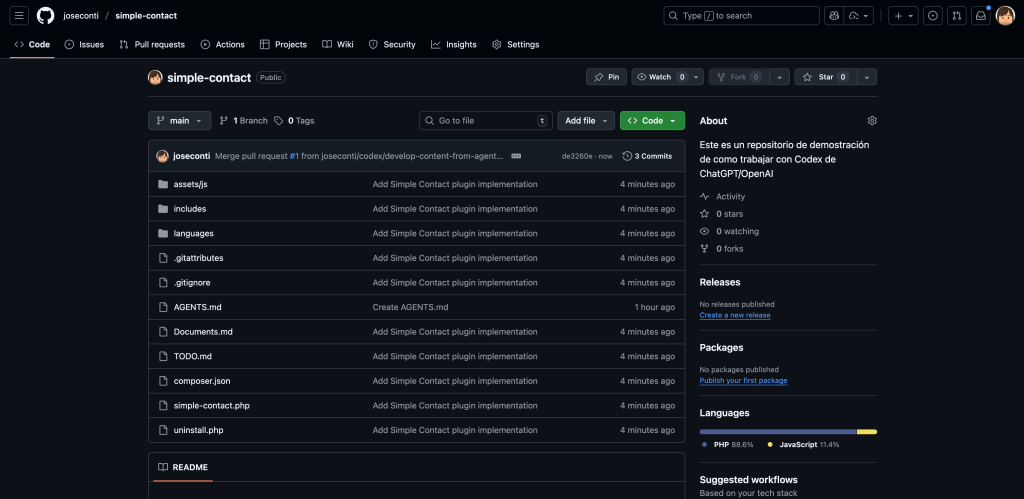
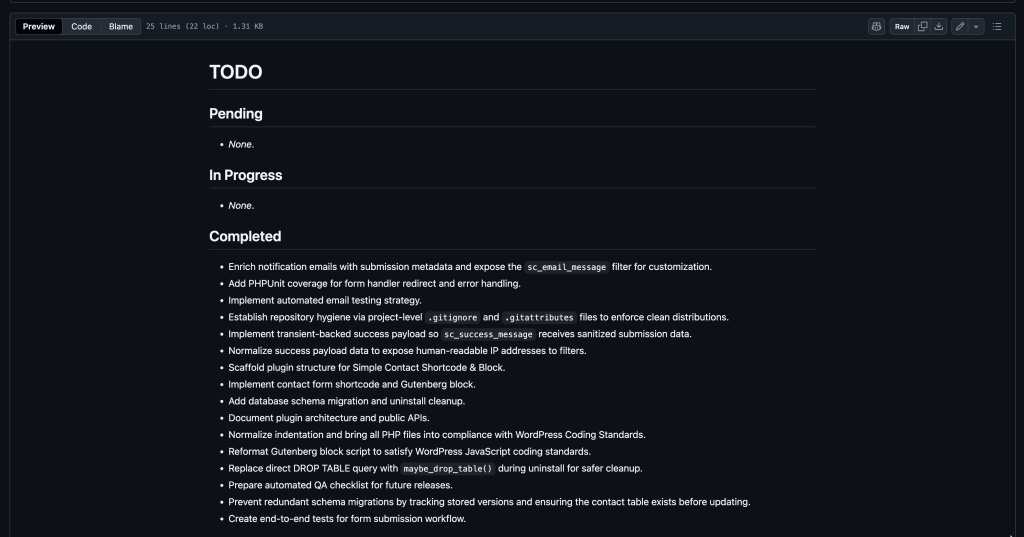
Now we can see the TODO.md and the Documents.md where we can track everything and start obtaining documentation for the future.
If we look at the TODO.md, at this point we can see that there are still many things in Progress and Pending, so Codex must continue. We just need to tell Codex to continue with the work.
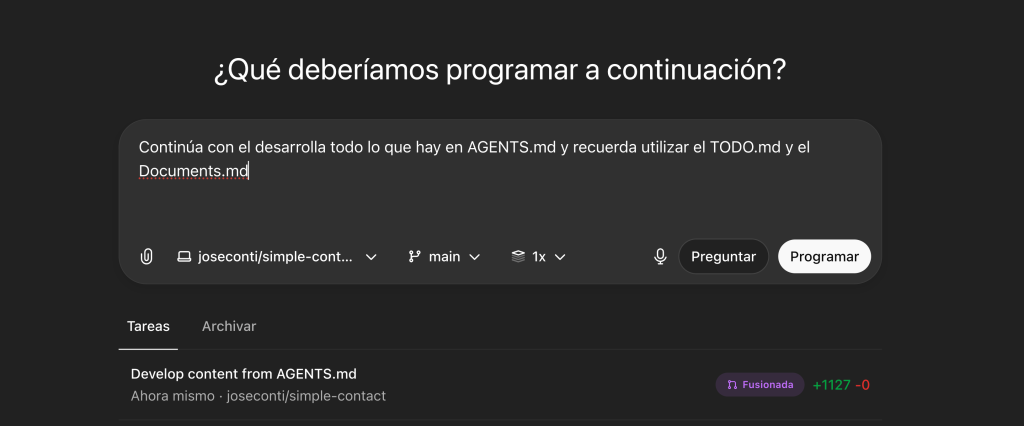
We will keep repeating this until there are no tasks left in the TODO.md and everything is done. There will come a time when there will be nothing in Pending and Progress, and we will be able to test the final result on a development site. Above all, ALWAYS in development.
Once installed, it may work on the first try or not; in my case, a fatal error occurred
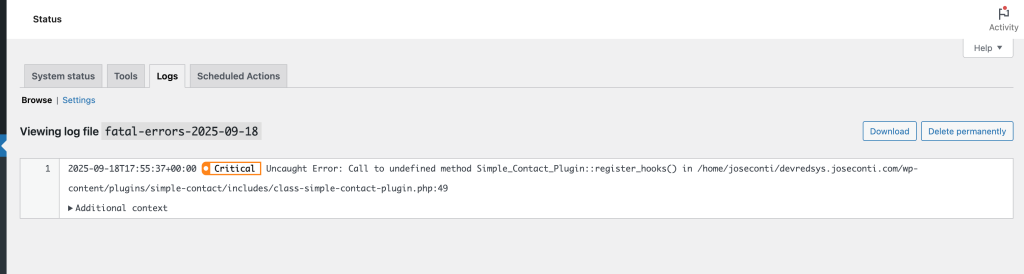
So what I do is copy the error so that Codex can fix it by giving it context.
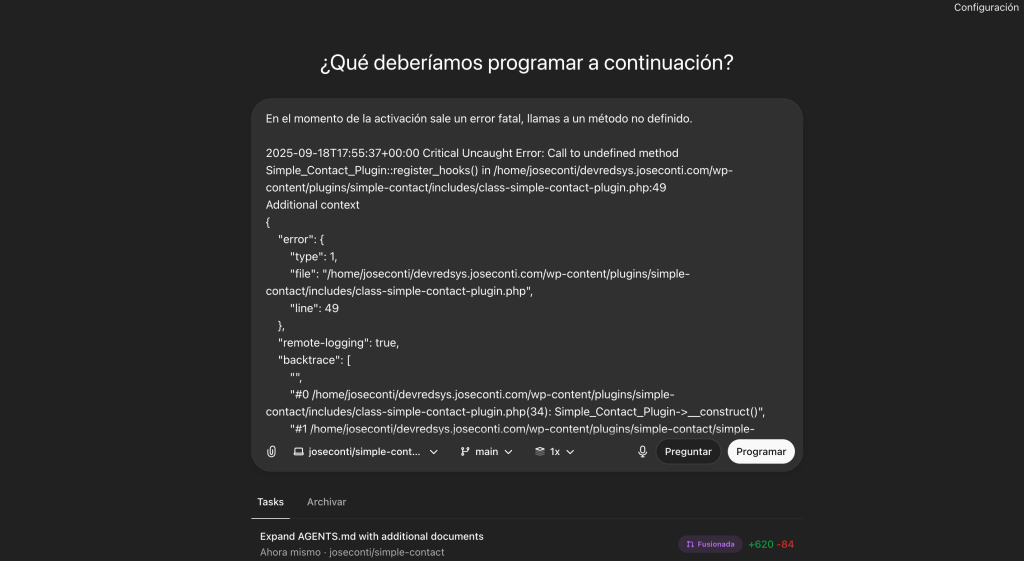
After finishing, it creates a new PR to fix it, and the plugin can now be activated
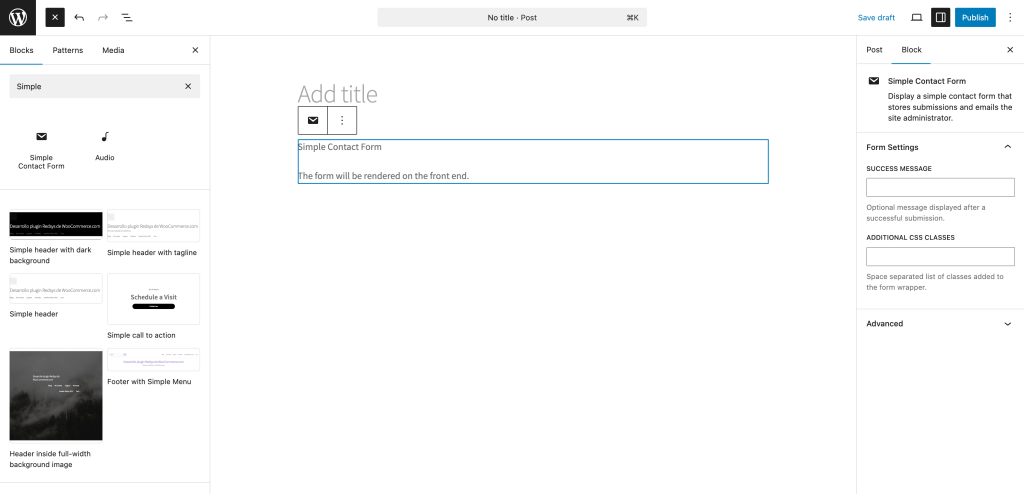
If we now create a new post/page, we will see in the blocks that there is one called “Simple Contact Form”, and that we can specify the success message for submission. In this case, since we did not specify in AGENTS.md that we should be able to configure the email to which it should be sent, it will always send it to the WordPress administrator’s email.
On the front end, we will see this (remember that we had specified that the form only had name and email)
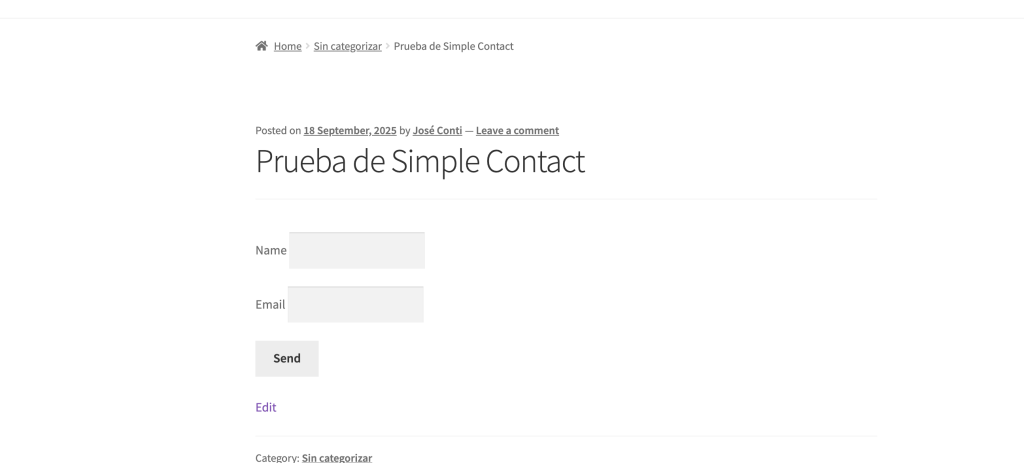
If you now wanted to add more fields, for example Subject and Comments, we would just need to ask Codex to update AGENTS.md, TODO.md, and Documents.md.
If I fill in the fields and click on Send, I receive this in the email
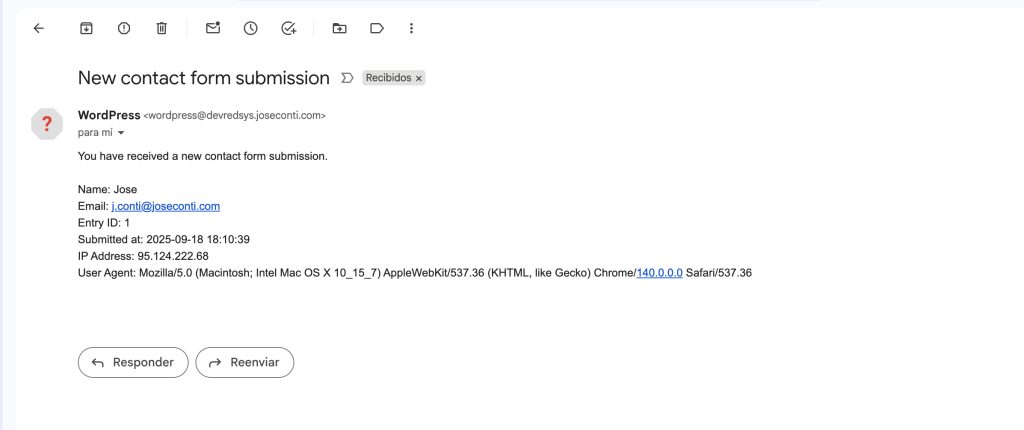
That is to say, we have only had one fatal error in the plugin that Codex developed for us, and it was fixed on the first try by indicating what it was.
This is a very simple plugin, but it is a plugin that incorporates a block for Gutenberg, which is not insignificant.
If we review everything we initially requested, we will see that some issues are missing, either because there is a bug and it is not displayed, or because it simply has not been done, so from this moment on, it is about making requests for fixes until we reach where we want.
10. Future of Agentic Coding
10.1. Greater autonomy, greater traceability
As models evolve, we will see agents capable of planning longer iterations, detecting dependencies, and coordinating more significant changes. The key will not only be raw power but traceability: preserving a history of decisions, assumptions, and acceptance criteria that make the PRs generated by AI auditable.
10.2. Testing and CI/CD integrated into the agent’s flow
The immediate future involves agents that integrate test generation and CI/CD pipelines: linters, tests, basic coverage, preview deploys, and performance reports. Your role will focus on designing policies: what is acceptable, what risks you do not tolerate, and how regressions should be reported.
10.3. Specialization by domains
We will see “tuned” agents for specific ecosystems (WordPress, WooCommerce, payment plugins, frontends with React/Blocks) with pre-learned conventions and catalogs of best practices. This will further reduce setup time and review effort.
10.4. Documentation as a product
Documentation will cease to be an appendix and become a parallel product maintained by the agent. Documents.md will evolve into navigable knowledge portals, with executable snippets, visual schemas, diagrams, and versioned recipes.
11. Conclusion
Agentic Coding is not asking an AI to “make a plugin,” but building a working relationship where you set the direction and the AI executes with discipline. The modern ecosystem —cloud, local, hybrid— allows you to choose the technical base; but the real differentiator lies in how you organize the process: AGENTS.md to set rules, TODO.md managed by the agent to orchestrate tasks, and Documents.md to capture real project knowledge while it is created.
This approach gives you speed without sacrificing quality: you reduce time on repetitive tasks, focus on architecture and important decisions, and keep technical debt at bay. What’s the result? More coherent projects, easier to maintain, and a smooth onboarding ramp for any future collaborator.
You have also seen how to prepare a practical example that you can complete with your agent: “Simple Contact”.
The future of development is collaborative: humans and agents working side by side with clear processes, firm standards, and constant evidence. Start today with your flow and your rules; the AI will do the rest under your direction.